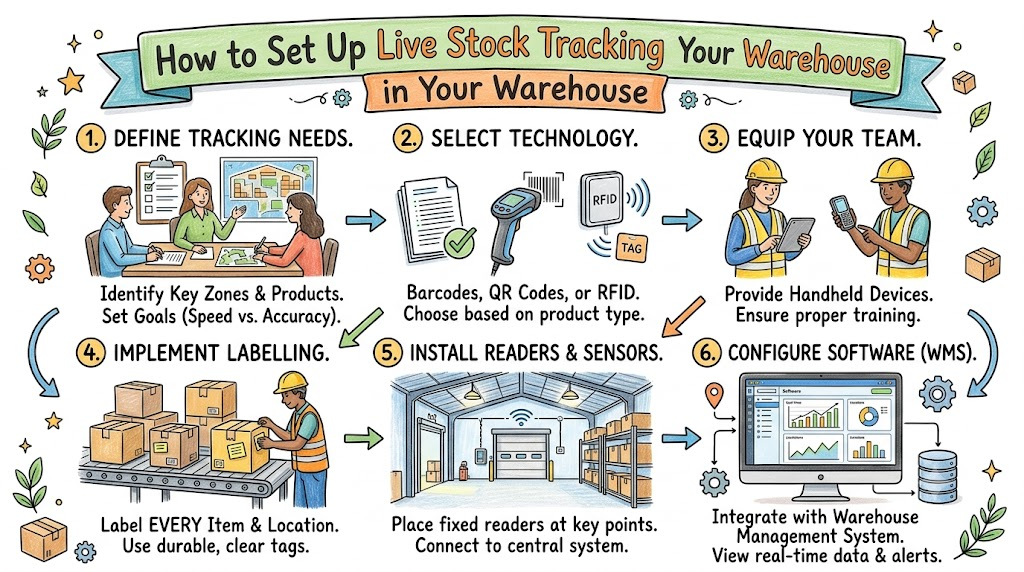
Running a warehouse without live tracking is like playing hide-and-seek in the dark. You search for boxes, but you cannot find them. A real-time inventory tracking system fixes this problem fast. It shows where every item sits the second it moves.
In simple words, real-time tracking means your computer updates right away. You do not wait until the end of the day to count items. When a worker grabs a box, the computer counts it instantly.
Why Counting by Hand Causes Big Trouble
Many older warehouses still use paper sheets and clipboards to count stock. Workers write numbers by hand with pencils all day long.
People make mistakes when they write fast. They write down the wrong numbers, or they lose their clipboards. When numbers do not match, angry buyers wait for missing boxes.
Also, hand counting wastes hours of quiet time. Workers spend all morning walking back and forth through aisles. That slow pace eats up company money and drains team energy.
What Does Live Stock Tracking Do?
Live tracking replaces slow paper clipboards with fast handheld scanners. Every shelf, box, and cart gets a unique digital tag.
When a worker moves an item, they scan that tag with a tool. The scanner talks directly to the main computer through wireless signals.
So, the stock room stays neat, organized, and up to date. Everyone sees the exact same count on their screens. You never sell items that you do not actually own.
Step 1: Pick the Right Smart Tags
First, you must pick the best label style for your boxes. Different warehouses need different kinds of tags to track products:
- Barcodes These black-and-white lines cost very little money to print. Workers must aim a red scanner beam right at them to read the code.
- QR codes These square grids hold a lot more product information. Regular smartphone cameras can read them quickly from any angle.
- RFID tags These smart chips send out silent radio signals without line-of-sight scans. A gate reader can scan fifty boxes on a cart in one second.
Step 2: Set Up Strong Wireless Internet
Next, build a strong internet network across your entire warehouse floor. Scanners need a solid signal to talk to the central database.
Metal shelves and tall stacks of boxes can block regular Wi-Fi signals. So, place extra signal boosters high on your warehouse walls.
Because drops in connection slow down work, test every corner. Ensure dead zones do not exist between the tall back aisles.
Step 3: Pick Simple Tracking Software
Now, pick easy tracking software for your warehouse team to use. Good software acts like a digital brain for your whole building.
Look for software that uses big buttons and clean screens. If the app feels too tricky, workers will avoid using it.
The software must update numbers in less than one second. It should also send quick text warnings when stock runs low. That way, you reorder items before your shelves sit empty.
Step 4: Train Your Team With Care
Technology only works well when your team knows how to use it. Never hand out scanners without showing workers the basic steps.
Run simple practice sessions in the mornings before the rush begins. Let workers scan test boxes and fix small typing mistakes together.
Listen closely to what your floor workers say during tests. If a scanner feels too heavy, buy lighter models with wrist straps. Happy workers make fewer counting mistakes during long shifts.
Step 5: Test the System With One Aisle
Do not try to change your entire building in one single day. That sudden move creates giant messes and stops shipping lines cold.
Instead, pick one small aisle for your first test run. Tag every box in that aisle and test your scanners there first.
Watch for small software bugs and fix them right away. Once that single aisle runs smoothly, expand the tags to other shelves. Step-by-step rollouts keep daily customer orders moving out the door.
Big Wins From Going Live
Switching to live tracking brings huge wins to your warehouse operations right away:
- Zero lost boxes You always know the exact shelf and bin for every single item.
- Lightning-fast packing Pickers walk straight to items without stopping to guess or search.
- Happy customers Orders leave your dock on time and arrive with the right items inside.
Keep Your Warehouse Moving Forward
Live tracking turns a messy warehouse into a clean, smooth machine. It stops workers from wandering around in search of lost products.
Because your team works faster, your daily shipping numbers jump up. You spend less time fixing mistakes and more time growing your sales.
Start by picking your smart tags and testing one single shelf today. Small, smart changes make your warehouse stronger every single week.

- Build Tough Software and Stop Website Freezes with SRESchool - September 26, 2026
- How to Set Up Live Stock Tracking in Your Warehouse - September 25, 2026
- The Benefits of Lean Inventory Management for SCM - September 25, 2026