Introduction
Brainstorming is the backbone of innovation, problem-solving, and creative collaboration. In 2026, with distributed teams, AI-powered productivity tools, and fast-paced project lifecycles, brainstorming tools have become essential for businesses, startups, and creative teams. These tools help capture ideas, visualize workflows, and foster collaboration in real time. Whether you’re a student, entrepreneur, or part of a global organization, choosing the right brainstorming tool ensures your team can transform raw ideas into actionable strategies.
When evaluating brainstorming tools in 2026, users should look for features like real-time collaboration, AI-assisted idea generation, mind mapping, integrations with project management apps, and cross-platform accessibility. Cost, scalability, and ease of use also play a vital role in decision-making. Below, we explore the top 10 brainstorming tools of 2026, their features, pros and cons, and a side-by-side comparison to help you choose the right solution.
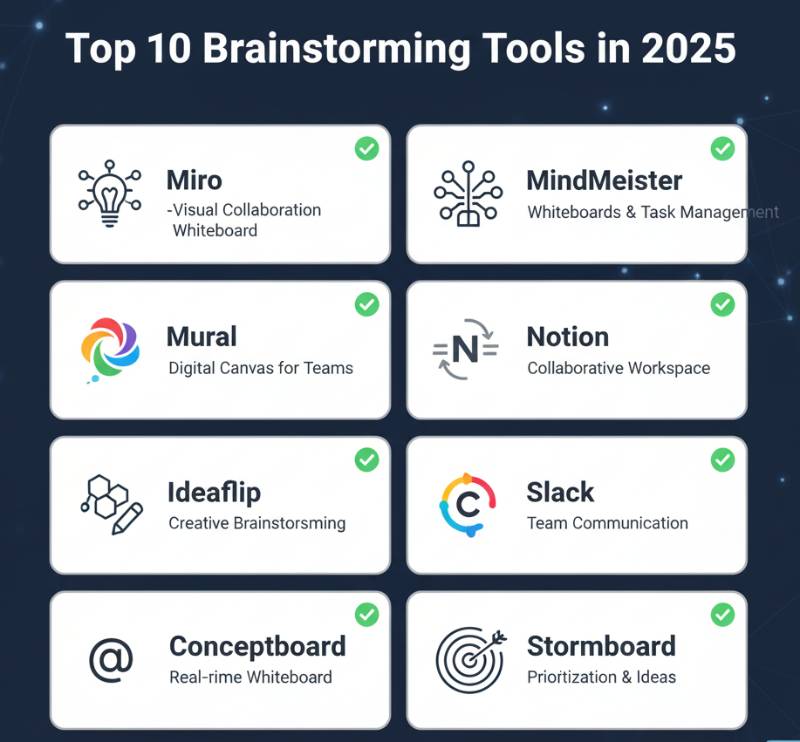
Top 10 Brainstorming Tools in 2026
1. Miro
Short Description: Miro is one of the most popular collaborative online whiteboards, perfect for brainstorming, agile planning, and creative sessions.
Key Features:
- Real-time collaborative whiteboard
- AI-powered sticky notes clustering
- Pre-built brainstorming templates
- Integration with Slack, Jira, Microsoft Teams
- Infinite canvas with drag-and-drop functionality
- Voting and prioritization tools
Pros:
- Highly intuitive and user-friendly
- Excellent integration ecosystem
- Great for both small and large teams
Cons:
- Can feel overwhelming for beginners
- Advanced features require paid plans
2. Lucidspark
Short Description: Lucidspark is a virtual whiteboard from Lucid, designed for brainstorming, mind mapping, and team ideation.
Key Features:
- Infinite canvas for flexible brainstorming
- Group collaboration with real-time updates
- AI clustering for idea organization
- Pre-built mind mapping and brainstorming templates
- Integrates with Lucidchart, Slack, Jira, and Zoom
- Voting and timer tools
Pros:
- Seamless integration with Lucid ecosystem
- Easy to use for structured brainstorming
- Strong enterprise security features
Cons:
- Limited free plan features
- Slight learning curve for new users
3. Stormboard
Short Description: Stormboard helps teams brainstorm, organize, and prioritize ideas with sticky notes and collaborative templates.
Key Features:
- Sticky note-style brainstorming
- Customizable brainstorming templates
- Reporting and analytics for idea tracking
- Real-time collaboration across devices
- Microsoft Teams and Slack integrations
- Project management workflows
Pros:
- Great for structured brainstorming
- Detailed reporting features
- Affordable pricing tiers
Cons:
- Less visually engaging than competitors
- Limited advanced AI features
4. MindMeister
Short Description: MindMeister is a leading online mind mapping tool, perfect for visual thinkers and idea organization.
Key Features:
- Interactive mind maps
- Drag-and-drop nodes for easy organization
- Real-time team collaboration
- AI-assisted map generation
- Task assignments linked to MeisterTask
- Mobile and desktop compatibility
Pros:
- Very intuitive for visual brainstorming
- Strong integration with MeisterTask
- Great for individual and team use
Cons:
- Limited free plan
- Less suitable for non-visual workflows
5. MURAL
Short Description: MURAL offers collaborative whiteboarding and design thinking tools, widely used by remote and hybrid teams.
Key Features:
- Digital sticky notes and brainstorming boards
- Extensive template library
- AI-assisted idea generation
- Real-time collaboration with voting tools
- Integrations with Zoom, Microsoft Teams, Jira
- Workshop facilitation features
Pros:
- Excellent for design thinking sessions
- Large template library
- Strong enterprise security and support
Cons:
- Can be resource-intensive for large boards
- Slightly expensive for smaller teams
6. ClickUp Whiteboards
Short Description: Part of the ClickUp productivity suite, Whiteboards allow brainstorming and direct connection to project tasks.
Key Features:
- Collaborative digital whiteboards
- Drag-and-drop tasks linked to ClickUp projects
- AI writing assistant
- Real-time collaboration
- Workflow and task automation integration
- Free forever plan
Pros:
- Seamless integration with project management
- Affordable with many free features
- AI productivity enhancements
Cons:
- Less flexible than standalone brainstorming tools
- Overloaded UI for some users
7. Coggle
Short Description: Coggle is a simple, easy-to-use online mind mapping tool, great for quick brainstorming and idea visualization.
Key Features:
- Unlimited image uploads
- Real-time collaboration
- Export to PDF/PNG
- Drag-and-drop branches
- Revision history tracking
- Simple, lightweight interface
Pros:
- Easy to learn and use
- Great for quick brainstorming sessions
- Affordable pricing
Cons:
- Lacks advanced AI features
- Not ideal for enterprise needs
8. IdeaFlip
Short Description: IdeaFlip is designed for brainstorming sessions using digital sticky notes and real-time collaboration.
Key Features:
- Simple sticky note boards
- Real-time collaboration
- Idea clustering and categorization
- Sharing and export options
- Cross-device support
- Minimalist design
Pros:
- Very lightweight and easy to use
- Great for small teams and freelancers
- Fast learning curve
Cons:
- Limited integrations
- Fewer advanced features
9. XMind
Short Description: XMind is a professional mind mapping and brainstorming tool, widely used for idea structuring and visual planning.
Key Features:
- Advanced mind mapping styles (tree, fishbone, org-chart)
- AI-powered brainstorming suggestions
- Mobile and desktop apps
- Export to PDF, PNG, Word, PowerPoint
- Brainstorming and presentation modes
- Offline functionality
Pros:
- Feature-rich mind mapping tool
- Great for professionals and educators
- Works offline as well
Cons:
- Paid-only for most advanced features
- UI feels complex for casual users
10. Stormz
Short Description: Stormz is built for workshops and brainstorming sessions, offering large-scale collaboration features.
Key Features:
- Digital brainstorming workshops
- Group voting and ranking tools
- Facilitation features for moderators
- Works for hybrid and large-scale teams
- Reporting and analytics
- Templates for ideation and strategy
Pros:
- Excellent for facilitators and large groups
- Structured brainstorming with analytics
- Great for corporate workshops
Cons:
- Expensive for small teams
- Requires training for facilitators
Comparison Table of Top 10 Brainstorming Tools in 2026
| Tool | Best For | Platforms Supported | Standout Feature | Pricing | Avg. Rating |
|---|---|---|---|---|---|
| Miro | Teams & enterprises | Web, iOS, Android | AI sticky clustering | Free / Starts $10 | 4.7/5 |
| Lucidspark | Design & agile teams | Web, iOS, Android | Lucid ecosystem link | Free / Starts $7 | 4.6/5 |
| Stormboard | Project brainstorming | Web, iOS, Android | Analytics & reporting | Free / Starts $5 | 4.5/5 |
| MindMeister | Visual thinkers | Web, iOS, Android | Mind mapping | Free / Starts $6 | 4.6/5 |
| MURAL | Remote/hybrid workshops | Web, iOS, Android | Design thinking focus | Free / Starts $12 | 4.7/5 |
| ClickUp WB | Task + brainstorming | Web, iOS, Android, Desktop | Task integration | Free / Starts $5 | 4.6/5 |
| Coggle | Students, freelancers | Web | Simplicity | Free / Starts $5 | 4.4/5 |
| IdeaFlip | Quick brainstorming | Web | Sticky note simplicity | Free trial / Starts $9 | 4.3/5 |
| XMind | Professionals, educators | Web, iOS, Android, Desktop | Advanced mind mapping | Starts $39/year | 4.7/5 |
| Stormz | Large workshops | Web | Facilitator controls | Custom pricing | 4.5/5 |
Which Brainstorming Tool is Right for You?
- Small Teams & Freelancers: Coggle, IdeaFlip (affordable, simple, and fast setup)
- Enterprises & Large Teams: Miro, MURAL, Lucidspark (scalable, secure, full-featured)
- Educators & Visual Planners: MindMeister, XMind (excellent for structured visual thinking)
- Project-Driven Teams: ClickUp Whiteboards, Stormboard (direct task integration, reporting)
- Workshops & Facilitators: Stormz, MURAL (ideal for design thinking and group sessions)
Conclusion
In 2026, brainstorming tools have evolved beyond digital sticky notes—they now integrate AI, advanced collaboration, and project execution features. Choosing the right solution depends on your team’s size, needs, and workflow. From lightweight options like Coggle and IdeaFlip to enterprise-grade platforms like Miro and MURAL, these tools empower teams to innovate faster and smarter.
For best results, try free plans or demos before committing. The future of brainstorming is collaborative, intelligent, and action-oriented—making these tools must-haves for modern teams.
FAQs on Brainstorming Tools in 2026
Q1. What are brainstorming tools?
Brainstorming tools are digital platforms that help teams generate, organize, and prioritize ideas collaboratively.
Q2. Are brainstorming tools only for businesses?
No, students, educators, freelancers, and creative individuals can also benefit from them.
Q3. Which is the best free brainstorming tool in 2026?
Miro and ClickUp Whiteboards offer powerful free versions suitable for most small teams.
Q4. How do AI features improve brainstorming tools?
AI assists in clustering, idea generation, and summarization, saving time and reducing cognitive overload.
Q5. Which tool is best for workshops?
MURAL and Stormz are specifically designed for structured workshops and large group brainstorming.

- Top 10 AI Model Serving Frameworks Tools in 2026: Features, Pros, Cons & Comparison - August 30, 2026
- Top 10 Construction Management Software Tools in 2026: Features, Pros, Cons & Comparison - August 11, 2026
- Top 10 AI Academic Writing Tools in 2026: Features, Pros, Cons & Comparison - August 11, 2026