Introduction
CAD/CAM Manufacturing Software is at the heart of modern industrial production. CAD (Computer-Aided Design) allows engineers and designers to create precise digital models, while CAM (Computer-Aided Manufacturing) converts those designs into machine-ready instructions for CNC machining, milling, turning, cutting, and additive manufacturing. Together, CAD/CAM software bridges the gap between design and production, ensuring accuracy, speed, and consistency. In today’s manufacturing environment, where precision, efficiency, and cost control are critical, CAD/CAM tools play a vital role. They reduce human error, improve production quality, shorten development cycles, and enable manufacturers to move seamlessly from concept to finished part. Industries such as aerospace, automotive, medical devices, consumer products, and industrial machinery rely heavily on CAD/CAM solutions to maintain competitiveness.
Best for:
Mechanical engineers, CNC programmers, manufacturing engineers, machine shops, product designers, industrial manufacturers, aerospace and automotive firms, medical device companies, and production-focused organizations of all sizes.
Not ideal for:
Users who only need basic 2D drafting, hobbyists without CNC or manufacturing workflows, or teams focused purely on conceptual design without physical production needs.
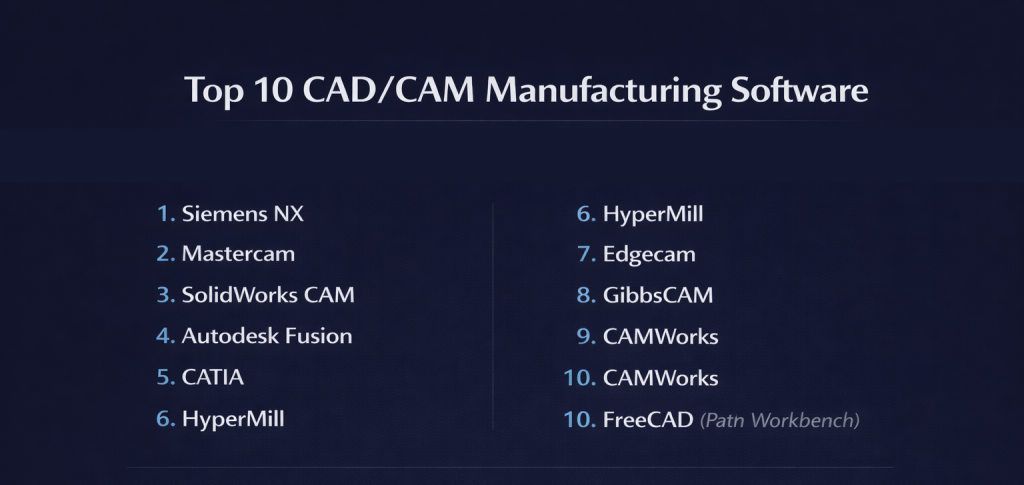
Top 10 CAD/CAM Manufacturing Software Tools
1 — Siemens NX
Short description:
Siemens NX is a high-end, enterprise-grade CAD/CAM solution designed for complex product design and advanced manufacturing.
Key features:
- Integrated CAD, CAM, and CAE platform
- Advanced multi-axis CNC machining
- High-precision surface and solid modeling
- Digital twin and simulation capabilities
- Automation and knowledge-based machining
- Scalable for large enterprise environments
Pros:
- Extremely powerful and precise
- Ideal for complex and high-tolerance parts
- Strong enterprise integration
Cons:
- Very high cost
- Steep learning curve
Security & compliance: ISO, enterprise security standards
Support & community: Enterprise-level support, professional training, strong industrial user base.
2 — Mastercam
Short description:
Mastercam is one of the most widely used CAM solutions, known for its CNC machining strength and broad machine compatibility.
Key features:
- Comprehensive CNC milling and turning
- Multi-axis machining support
- Extensive post-processor library
- Toolpath simulation and verification
- Strong CAD import capabilities
- Shop-floor friendly workflows
Pros:
- Industry-trusted CAM performance
- Large user and reseller ecosystem
- Excellent CNC control
Cons:
- CAD features are limited compared to full CAD suites
- Interface can feel dated
Security & compliance: Varies / N/A
Support & community: Very large global community, strong reseller and training network.
3 — SolidWorks CAM
Short description:
SolidWorks CAM integrates manufacturing directly into the SolidWorks CAD environment, enabling streamlined design-to-manufacturing workflows.
Key features:
- Seamless CAD-CAM integration
- Feature-based machining
- Automatic toolpath generation
- CNC milling and turning support
- Design change synchronization
- Built-in simulation
Pros:
- Easy transition from design to machining
- Ideal for SolidWorks users
- Reduced programming time
Cons:
- Limited advanced CAM strategies
- Less suitable for very complex machining
Security & compliance: Varies / N/A
Support & community: Strong documentation, large SolidWorks community, professional support.
4 — Autodesk Fusion
Short description:
Autodesk Fusion is a cloud-connected CAD/CAM platform designed for modern, agile manufacturing teams.
Key features:
- Integrated CAD, CAM, and simulation
- Cloud-based collaboration
- CNC milling, turning, and additive workflows
- Parametric and direct modeling
- Generative design tools
- Regular feature updates
Pros:
- Excellent value for small teams
- Modern and intuitive interface
- Strong all-in-one workflow
Cons:
- Cloud dependency may concern some users
- Advanced CAM features are limited
Security & compliance: GDPR, SOC-aligned cloud practices
Support & community: Extensive learning resources, active community, responsive support.
5 — CATIA
Short description:
CATIA is a premium CAD/CAM platform widely used in aerospace, automotive, and advanced industrial manufacturing.
Key features:
- Advanced surface and solid modeling
- High-end machining strategies
- Complex geometry handling
- Full product lifecycle support
- Digital manufacturing simulation
- Enterprise scalability
Pros:
- Exceptional design and manufacturing depth
- Ideal for complex, large-scale projects
- Proven in mission-critical industries
Cons:
- Very expensive
- Requires extensive training
Security & compliance: ISO, enterprise-grade security controls
Support & community: Professional enterprise support and specialized expert community.
6 — HyperMill
Short description:
HyperMill is a powerful CAM solution known for advanced 5-axis machining and automation.
Key features:
- High-performance 3-axis to 5-axis machining
- Collision-free toolpath generation
- Advanced automation features
- CNC simulation and verification
- Supports complex geometries
- Strong post-processor flexibility
Pros:
- Excellent for complex CNC machining
- High reliability and accuracy
- Strong automation capabilities
Cons:
- Focused mainly on CAM, not CAD
- Higher cost than mid-range tools
Security & compliance: Varies / N/A
Support & community: Professional support, strong industrial adoption.
7 — Edgecam
Short description:
Edgecam is a production-focused CAM system designed to optimize CNC machining efficiency.
Key features:
- Automated machining cycles
- Feature recognition
- Multi-axis machining
- Digital twin simulation
- Shop-floor optimized workflows
- Machine-specific customization
Pros:
- Efficient CNC programming
- Strong automation
- Good shop-floor usability
Cons:
- Limited CAD modeling
- Less suitable for design-heavy workflows
Security & compliance: Varies / N/A
Support & community: Solid documentation and professional support.
8 — GibbsCAM
Short description:
GibbsCAM is a flexible CAM software built for ease of use and reliable CNC programming.
Key features:
- Intuitive CNC programming interface
- Multi-task machining support
- Toolpath visualization
- Strong post-processing
- Customizable workflows
- Efficient setup reduction
Pros:
- Easy to learn
- Reliable machining results
- Good balance of power and simplicity
Cons:
- Limited advanced CAD features
- Smaller ecosystem
Security & compliance: Varies / N/A
Support & community: Good documentation and responsive support.
9 — CAMWorks
Short description:
CAMWorks is a feature-based CAM solution tightly integrated with SolidWorks.
Key features:
- Feature-based CNC machining
- Automatic toolpath generation
- Knowledge-based machining
- SolidWorks integration
- CNC simulation
- Rule-driven workflows
Pros:
- Fast programming for repeat parts
- Good automation capabilities
- Ideal for SolidWorks users
Cons:
- Less flexible for custom workflows
- Dependent on SolidWorks environment
Security & compliance: Varies / N/A
Support & community: Active user base and structured support.
10 — FreeCAD (Path Workbench)
Short description:
FreeCAD provides an open-source CAD/CAM option suitable for learning and basic manufacturing tasks.
Key features:
- Parametric CAD modeling
- Open-source architecture
- CNC toolpath generation
- Customizable workflows
- Cross-platform support
- Community-driven development
Pros:
- Free and open-source
- Flexible and extensible
- Good for learning CAD/CAM fundamentals
Cons:
- Limited advanced CAM features
- Requires technical knowledge
Security & compliance: N/A
Support & community: Community forums and documentation.
Comparison Table
| Tool Name | Best For | Platform(s) Supported | Standout Feature | Rating |
|---|---|---|---|---|
| Siemens NX | Enterprise manufacturing | Windows | End-to-end CAD/CAM | N/A |
| Mastercam | CNC machining | Windows | CNC dominance | N/A |
| SolidWorks CAM | Design-to-manufacturing | Windows | CAD-CAM integration | N/A |
| Autodesk Fusion | SMBs & startups | Win / macOS | Cloud-based CAD/CAM | N/A |
| CATIA | Aerospace & automotive | Windows | Advanced geometry | N/A |
| HyperMill | 5-axis machining | Windows | Advanced CAM automation | N/A |
| Edgecam | Production CNC | Windows | Machining automation | N/A |
| GibbsCAM | CNC programmers | Windows | Ease of use | N/A |
| CAMWorks | SolidWorks users | Windows | Feature-based machining | N/A |
| FreeCAD | Learning & experimentation | Win / macOS / Linux | Open-source CAD/CAM | N/A |
Evaluation & Scoring of CAD/CAM Manufacturing Software
| Criteria | Weight |
|---|---|
| Core features | 25% |
| Ease of use | 15% |
| Integrations & ecosystem | 15% |
| Security & compliance | 10% |
| Performance & reliability | 10% |
| Support & community | 10% |
| Price / value | 15% |
Which CAD/CAM Manufacturing Software Tool Is Right for You?
- Solo users & learners: FreeCAD, Autodesk Fusion
- SMBs & machine shops: Mastercam, SolidWorks CAM, CAMWorks
- Mid-market manufacturers: HyperMill, Edgecam, GibbsCAM
- Enterprise & complex manufacturing: Siemens NX, CATIA
Budget-conscious users should prioritize integrated and flexible tools, while enterprises benefit from deep automation, scalability, and compliance-ready platforms.
Frequently Asked Questions (FAQs)
- What is CAD/CAM software used for?
It designs parts digitally and converts them into machine-ready instructions. - Is CAD/CAM required for CNC machines?
Yes, most CNC workflows rely on CAD/CAM software. - Which CAD/CAM tool is best for beginners?
Autodesk Fusion and FreeCAD are beginner-friendly. - Is cloud-based CAD/CAM safe?
Modern platforms follow strong security practices. - Can CAD/CAM reduce production errors?
Yes, simulation and automation reduce mistakes. - Which industries rely most on CAD/CAM?
Aerospace, automotive, medical, and manufacturing. - Is open-source CAD/CAM reliable?
Good for learning, limited for advanced production. - Do these tools support multi-axis machining?
Most professional tools do. - How long does it take to learn CAD/CAM?
Several weeks to months depending on complexity. - What is the biggest mistake users make?
Ignoring simulation and verification steps.
Conclusion
CAD/CAM Manufacturing Software is essential for modern production, enabling precision, efficiency, and scalability. From simple CNC machining to advanced multi-axis manufacturing, the right tool depends on project complexity, budget, and workflow requirements. There is no universal winner—only the solution that best fits your manufacturing goals. Choosing wisely ensures smoother operations, higher quality output, and long-term competitive advantage.

- Top 10 Email Deliverability Tools: Features, Pros, Cons & Comparison - September 6, 2026
- Top 10 Pharmacovigilance Software: Features, Pros, Cons & Comparison - September 6, 2026
- Top 10 Manufacturing Execution Systems (MES) - July 30, 2026