Introduction
Kubernetes Management Platforms (KMP) are sophisticated software suites designed to simplify the deployment, scaling, and day-to-day operations of Kubernetes clusters across diverse environments. While Kubernetes itself is an open-source “orchestrator” that manages containers, it is notoriously complex to configure, secure, and monitor manually. A management platform sits on top of Kubernetes, providing a unified dashboard, automated workflows, and standardized security policies that transform a collection of raw clusters into a cohesive, enterprise-grade infrastructure.
These platforms are vital because they bridge the “skills gap” in cloud-native engineering. Instead of requiring every developer to be an expert in YAML and command-line interfaces, KMPs offer visual tools and “one-click” operations. Key real-world use cases include multi-cloud cluster management, where a company runs workloads on both AWS and on-premise servers, automated patch management to close security vulnerabilities, and centralized cost tracking for cloud resources. When choosing a platform, evaluation criteria should include ease of installation, multi-cluster visibility, role-based access control (RBAC) depth, and vendor neutrality.
Best for: Platform engineers, DevOps teams, and IT directors in medium-to-large enterprises who need to manage multiple Kubernetes clusters at scale. They are essential for highly regulated industries like fintech and healthcare that require strict auditing and security compliance across all containerized workloads.
Not ideal for: Early-stage startups or individual developers running a single, small cluster. For these users, the overhead and licensing costs of a management platform likely outweigh the benefits, and they may be better served by native cloud consoles or simple command-line tools.
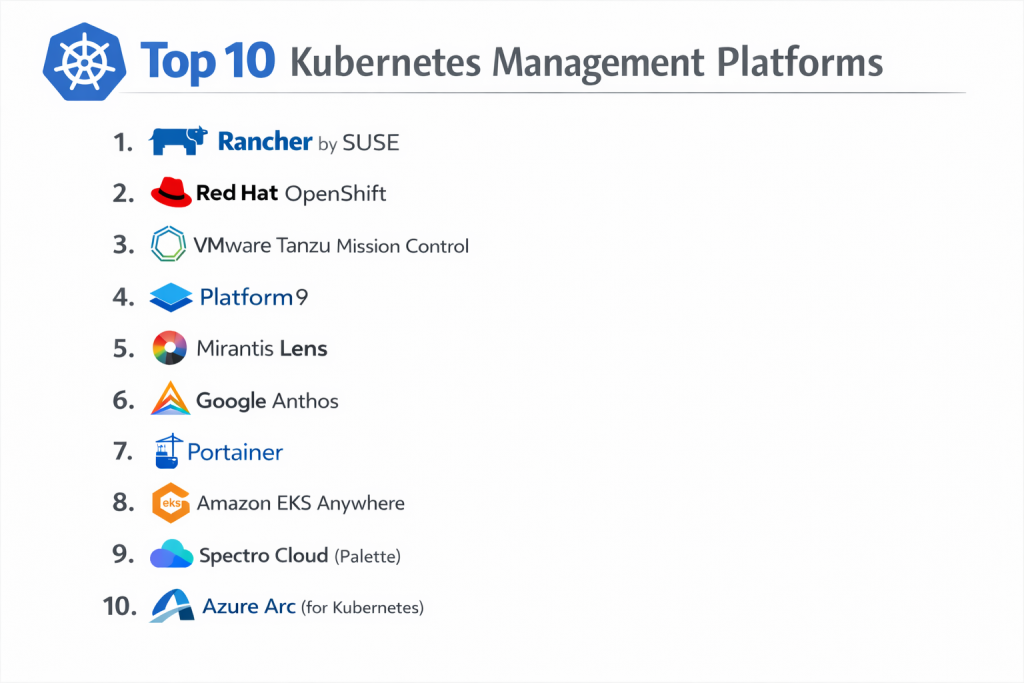
Top 10 Kubernetes Management Platforms Tools
1 — Rancher by SUSE
Rancher is widely considered the industry standard for open-source multi-cluster Kubernetes management. It provides a unified management plane for any Kubernetes cluster, regardless of whether it is running on-premise, in the cloud, or at the edge.
- Key features:
- Unified Cluster Management: Centrally manage EKS, GKE, AKS, and bare-metal clusters from a single UI.
- Centralized Authentication: Sync with Active Directory, LDAP, or GitHub to manage users across all clusters.
- RKE (Rancher Kubernetes Engine): A lightweight, CNCF-certified Kubernetes distribution.
- Fleet: A GitOps engine designed to manage thousands of clusters simultaneously.
- App Catalog: A built-in library of Helm charts for easy application deployment.
- Global Security Policies: Define and enforce security rules across every managed cluster.
- Multi-tenant Support: Securely isolate different teams and projects within the same platform.
- Pros:
- Completely vendor-agnostic, preventing cloud provider lock-in and allowing for true hybrid-cloud strategies.
- Exceptionally intuitive web interface that makes complex K8s tasks accessible to non-experts.
- Cons:
- The Rancher management server itself is a single point of failure that requires careful backup and scaling.
- Some users find the sheer number of features overwhelming for simple use cases.
- Security & compliance: CIS Benchmark scanning, SSO integration, RBAC, and SOC 2 compliant distributions.
- Support & community: Active community Slack and forums; professional 24/7 enterprise support provided by SUSE.
2 — Red Hat OpenShift
OpenShift is a heavyweight enterprise Kubernetes platform that focuses on providing a full “developer-to-production” experience with built-in security and automation tools.
- Key features:
- Source-to-Image (S2I): Automatically builds container images directly from raw source code in Git.
- Operator Framework: Automates the lifecycle of complex applications like databases and message queues.
- Integrated CI/CD: Built-in Jenkins and Tekton pipelines for automated software delivery.
- Advanced Web Console: One of the most functional and data-rich UIs in the container world.
- Red Hat Quay: An enterprise-grade registry with integrated security and vulnerability scanning.
- Over-the-Air Updates: One-click updates for the entire stack, from the OS to the K8s API.
- Mesh Networking: Built-in Istio support for service-to-service communication.
- Pros:
- “Opinionated” and highly secure defaults that make it suitable for high-compliance government and financial sectors.
- Offers a consistent experience across all major clouds and private data centers.
- Cons:
- Significant resource overhead; requires substantial RAM and CPU just to run the platform components.
- Very high cost of entry compared to open-source alternatives.
- Security & compliance: FIPS 140-2, SELinux hardening, SOC 2, HIPAA, and PCI DSS.
- Support & community: Backed by Red Hat’s legendary enterprise support ecosystem and extensive training programs.
3 — VMware Tanzu Mission Control
Tanzu Mission Control is a centralized management hub from VMware that allows organizations to govern their Kubernetes footprint across clouds with a focus on operational consistency.
- Key features:
- Cluster Lifecycle Management: Provision, upgrade, and delete clusters across AWS, Azure, and vSphere.
- Policy Management: Centralized management for access, network, and registry policies.
- Data Protection: Built-in integration with Velero for cluster backups and disaster recovery.
- Health Monitoring: Real-time visibility into cluster health and resource consumption.
- Tanzu Observability: Advanced metrics and logging powered by Wavefront.
- Connectivity Services: Manages ingress and service mesh across multiple clusters.
- Identity & Access: Centralized RBAC that integrates with corporate identity providers.
- Pros:
- The logical choice for enterprises already standardized on the VMware vSphere ecosystem.
- Bridges the gap between traditional IT infrastructure and modern containerized workloads.
- Cons:
- Complex licensing and product tiers can be difficult for buyers to navigate.
- Best experience is often tied to other expensive VMware products (NSX, vSAN).
- Security & compliance: SOC 2, HIPAA, GDPR, and ISO 27001.
- Support & community: Premium enterprise support with deep expertise in legacy and modern infrastructure.
4 — Platform9
Platform9 offers a “SaaS-managed” Kubernetes experience, meaning they manage the control plane and maintenance of your clusters for you, regardless of where your hardware lives.
- Key features:
- SaaS Management Plane: The K8s “brain” is managed by Platform9, reducing your operational burden.
- Bare-Metal Orchestrator: Specifically designed to turn physical on-prem servers into K8s nodes.
- 24/7 Monitoring: Automated alerting and proactive remediation of cluster issues by their engineers.
- One-Click Upgrades: Zero-downtime upgrades for both the hypervisor and Kubernetes.
- Serverless Support: Built-in integration with Fission for serverless functions on K8s.
- Multi-cloud Support: Manages clusters on AWS, Azure, and Google Cloud alongside on-prem.
- ArgoCD Integration: Native support for GitOps-driven application deployment.
- Pros:
- Drastically reduces the “Day 2” operational overhead for teams that don’t want to manage K8s internals.
- Excellent for “Edge” computing where managing remote physical servers is a challenge.
- Cons:
- Dependence on a third-party SaaS provider for your infrastructure’s “control center.”
- Pricing can scale quickly as you add more managed nodes.
- Security & compliance: SSO, encrypted communications, SOC 2, and HIPAA.
- Support & community: High-touch support with guaranteed response times; known for their “Always-on” monitoring.
5 — Mirantis Lens
Lens (and the associated Mirantis Kubernetes Engine) is a developer-centric management platform that provides a powerful desktop IDE experience for interacting with Kubernetes clusters.
- Key features:
- Desktop IDE: A high-performance GUI that runs on Windows, Mac, and Linux to manage K8s.
- Multi-cluster View: Connect to any cluster (EKS, GKE, local) simultaneously.
- Real-time Metrics: Built-in Prometheus integration for instant performance graphs.
- Cluster Hardening: Mirantis Kubernetes Engine provides a FIPS-validated K8s distribution.
- Terminal Integration: A built-in terminal that automatically syncs with the cluster you are viewing.
- Extension API: A thriving ecosystem of plugins for security, storage, and networking tools.
- Helm Management: Search, install, and manage Helm charts directly through the GUI.
- Pros:
- Significantly improves developer productivity by replacing complex
kubectlcommands with a visual interface. - The Lens Desktop app is free and extremely popular among engineers for local cluster management.
- Significantly improves developer productivity by replacing complex
- Cons:
- Lens itself is a desktop tool; for enterprise-wide policy and governance, you need the Mirantis “Pro” or “Enterprise” backend.
- Some advanced features are locked behind the commercial Mirantis subscription.
- Security & compliance: FIPS 140-2, SOC 2, and GDPR compliant (Varies by product tier).
- Support & community: Massive community of over 500,000 users; professional support for enterprise customers.
6 — Google Anthos
Anthos is Google Cloud’s hybrid and multi-cloud platform that lets you manage clusters anywhere—on-prem, in GCP, or even on AWS and Azure—using a single management style.
- Key features:
- Config Management: Use Git to define your cluster state and have Anthos automatically enforce it everywhere.
- Service Mesh: Managed Istio support for secure service communication and observability.
- Anthos Clusters: A common K8s distribution that runs on different clouds and bare metal.
- Binary Authorization: Ensure only trusted, signed images are deployed in your environment.
- Cloud Console Integration: Manage on-prem hardware via the familiar Google Cloud interface.
- Anthos VM Runtime: Run virtual machines alongside containers on the same K8s platform.
- Serverless Integration: Run Cloud Run (Knative) workloads on any Anthos cluster.
- Pros:
- Offers the most advanced “Service Mesh” and networking features in the management category.
- Ideal for organizations that want Google’s operational excellence in their own data center.
- Cons:
- Very expensive and often requires a long-term commitment to the Google Cloud ecosystem.
- Can be overly complex for organizations that don’t need advanced hybrid-cloud features.
- Security & compliance: FedRAMP High, SOC 2, ISO 27001, and HIPAA.
- Support & community: Premium Google Cloud support and a massive ecosystem of cloud-native documentation.
7 — Portainer
Portainer is a universal container management platform that focuses on simplicity. It is designed to be a “low-code” interface for managing Docker, Swarm, and Kubernetes.
- Key features:
- Simplified UI: Hides the complexity of Kubernetes manifests behind intuitive web forms.
- App Templates: One-click deployment for common applications and database stacks.
- Resource Visualization: Simple graphs for CPU, RAM, and network usage per container.
- Kubernetes “Easy Mode”: An interface that guides users through K8s concepts without YAML.
- GitOps Integration: Automatically update applications when the source code in Git changes.
- RBAC: Simple, visual management of user permissions and team access.
- Edge Management: A specialized “Edge Agent” for managing remote, low-power devices.
- Pros:
- The most accessible platform for teams that are new to Kubernetes and don’t have dedicated DevOps staff.
- Incredibly fast to set up; you can be managing clusters in less than 15 minutes.
- Cons:
- Lacks some of the “deep” enterprise features (like advanced service mesh) found in OpenShift or Anthos.
- Not designed for massive, global-scale cluster orchestration.
- Security & compliance: SSO (OAuth/SAML), audit logs, and GDPR compliance.
- Support & community: Strong Discord community and professional support for Business Edition users.
8 — Amazon EKS Anywhere
EKS Anywhere is an extension of Amazon’s managed Kubernetes service that allows you to manage on-premise Kubernetes clusters using the same tools and APIs as AWS.
- Key features:
- Consistent API: Use the same
eksctlcommands to manage clusters on-prem as you do in AWS. - EKS Distro: A hardened, open-source distribution of Kubernetes used by Amazon internally.
- Disconnected Operation: Clusters can run even if they lose their connection to the AWS cloud.
- AWS Console Integration: View all your clusters (cloud and on-prem) in the AWS dashboard.
- Bare-Metal Support: Automated provisioning for physical server hardware.
- Support for GitOps: Integrated Flux support for managing cluster state via code.
- Integrated OS: Uses Amazon’s “Bottlerocket” OS, which is purpose-built for containers.
- Consistent API: Use the same
- Pros:
- Zero extra management cost for the software itself if you are already using AWS support.
- Perfect for AWS-centric teams who need to maintain some workloads on-premise for latency or data residency.
- Cons:
- Deeply tied to the AWS ecosystem; not a “neutral” platform for multi-cloud enthusiasts.
- Fewer built-in “GUI” features compared to Rancher or Portainer.
- Security & compliance: IAM integration, SOC 1/2/3, HIPAA, and PCI DSS.
- Support & community: High-quality AWS support and the largest cloud-native documentation library in existence.
9 — Spectro Cloud (Palette)
Spectro Cloud Palette is a modern, lifecycle management platform that focuses on “full-stack” cluster management, covering the OS, Kubernetes, and all add-on services.
- Key features:
- Cluster Profiles: Create templates that define the OS, K8s version, CNI, and CSI for every cluster.
- Full-Stack Governance: Ensures that every cluster in the company follows the exact same “blueprint.”
- Self-Healing: Automatically detects and repairs clusters that have “drifted” from their profile.
- Cost Visibility: Integrated cost tracking and optimization for multi-cloud deployments.
- Edge Management: Specialized “Palette Edge” for managing large-scale decentralized hardware.
- No-Lock-in: Allows you to swap out components (like switching from Calico to Cilium) easily.
- Integrated Backup: Native backup and restore workflows for every managed cluster.
- Pros:
- Excellent for “Day 2” operations, ensuring that hundreds of clusters remain standardized over time.
- Provides a very high level of flexibility without sacrificing centralized control.
- Cons:
- A newer player in the market with a smaller community than Rancher or VMware.
- Requires a shift in mindset to “Profile-based” management.
- Security & compliance: FIPS support, SOC 2, HIPAA, and granular RBAC.
- Support & community: Responsive professional support and a growing library of technical blueprints.
10 — Azure Arc (for Kubernetes)
Azure Arc is Microsoft’s management platform that “projects” on-premise and multi-cloud Kubernetes clusters into the Azure Resource Manager for unified governance.
- Key features:
- Unified Console: View and manage GKE, EKS, and on-prem clusters within the Azure Portal.
- GitOps Management: Centrally deploy configurations to clusters using Git and Flux.
- Azure Monitor Integration: Get logs and performance metrics from any cluster in one dashboard.
- Microsoft Entra ID (Azure AD): Use your corporate identity to manage access to non-Azure clusters.
- Azure Policy: Enforce security and compliance rules across all clusters globally.
- Azure Defender: Advanced threat protection for containers regardless of where they are running.
- Data Services: Run Azure SQL and PostgreSQL on any K8s cluster via Arc.
- Pros:
- The absolute best choice for organizations that have standardized on Microsoft Azure but have “satellite” workloads elsewhere.
- Turns any Kubernetes cluster into an “Azure-like” resource with familiar management tools.
- Cons:
- Requires a constant connection to Azure to maintain full management capabilities.
- Pricing can be complex as it is based on the number of “Arc-enabled” resources.
- Security & compliance: ISO, SOC, HIPAA, PCI DSS, and Entra ID integration.
- Support & community: World-class Microsoft support and a massive community of Azure-certified engineers.
Comparison Table
| Tool Name | Best For | Platform(s) Supported | Standout Feature | Rating (Gartner) |
| Rancher | Multi-cluster Freedom | Any / Hybrid | Vendor Neutrality | 4.7 / 5 |
| OpenShift | Enterprise Security | Any / Hybrid | Source-to-Image (S2I) | 4.7 / 5 |
| Tanzu MC | VMware Ecosystem | vSphere / Cloud | vSphere Native K8s | 4.4 / 5 |
| Platform9 | Managed Service | Bare Metal / Cloud | Proactive Monitoring | 4.6 / 5 |
| Lens (Mirantis) | Developer Productivity | Desktop GUI | IDE Integration | N/A |
| Google Anthos | Service Mesh / Networking | Any / Hybrid | Managed Istio | 4.7 / 5 |
| Portainer | Ease of Use / SMB | Docker / K8s | Low-code Interface | N/A |
| EKS Anywhere | AWS-centric Hybrid | Bare Metal / AWS | AWS Console Sync | 4.6 / 5 |
| Spectro Cloud | Full-stack Governance | Any / Edge | Profile-based Blueprints | N/A |
| Azure Arc | Microsoft Ecosystem | Any / Hybrid | Azure Policy Sync | 4.6 / 5 |
Evaluation & Scoring of Kubernetes Management Platforms
| Category | Weight | Score (Avg) | Evaluation Notes |
| Core Features | 25% | 9.2 / 10 | Standards are high; multi-cluster management is now a baseline. |
| Ease of Use | 15% | 7.5 / 10 | Portainer and Rancher lead; Anthos/OpenShift are complex. |
| Integrations | 15% | 9.0 / 10 | Cloud platforms (AWS/Azure) have the best native integrations. |
| Security & Compliance | 10% | 9.4 / 10 | OpenShift and Anthos provide the most hardened defaults. |
| Performance | 10% | 9.0 / 10 | Most modern management planes have <2% overhead on nodes. |
| Support & Community | 10% | 8.8 / 10 | Rancher and Lens have the most vibrant open-source communities. |
| Price / Value | 15% | 8.0 / 10 | Open-source Rancher and Portainer provide immense value. |
Which Kubernetes Management Platforms Tool Is Right for You?
Solo Users vs SMB vs Mid-market vs Enterprise
- Solo Users: Start with Lens Desktop. It’s free, runs on your laptop, and gives you a visual view of any cluster without needing a backend server.
- SMB (10–100 Nodes): Portainer is the ideal choice. It allows a small team to manage clusters without becoming Kubernetes “black belts.”
- Mid-market: Rancher is the sweet spot. It provides enterprise features and multi-cluster control without the crushing costs of the big cloud vendors.
- Enterprise: Red Hat OpenShift or Google Anthos are the standard. They provide the “hand-holding,” security certifications, and global scale that large corporations demand.
Budget-conscious vs Premium Solutions
If you have zero budget for licensing, Rancher and Portainer (Community Edition) are world-class tools. If you have a significant budget and want to reduce “labor costs,” Platform9 or GKE/EKS managed services are worth the premium because they automate the most difficult maintenance tasks.
Feature Depth vs Ease of Use
If you need absolute control and custom service meshes, OpenShift and Anthos have the most depth. If you just want to get your apps running quickly and safely, Portainer or Lens are far easier to master.
Integration and Scalability Needs
If you are 100% in one cloud, use that provider’s tool (EKS Anywhere or Azure Arc). If you are building a “Multi-cloud” or “Edge” future, Spectro Cloud or Rancher offer the flexibility to move between providers without changing your management style.
Frequently Asked Questions (FAQs)
1. Why do I need a management platform if Kubernetes has a CLI?
The CLI (kubectl) is great for one machine, but it’s hard to use for managing 100 clusters. A platform provides a “GUI,” centralized security, and automated updates that the CLI simply can’t do at scale.
2. Is Rancher really free?
Yes, the open-source version of Rancher is fully functional and free. You only pay if you want professional support from SUSE or access to certain enterprise-only hardened features.
3. What is “Drift Detection” in KMP?
Drift detection is a feature (found in tools like Spectro Cloud) that alerts you when someone manually changes a cluster setting that violates your company’s standard “blueprint.”
4. Can I manage on-premise servers with these tools?
Yes. Platforms like OpenShift, Rancher, Anthos, and Platform9 are specifically designed to treat physical on-prem servers just like cloud instances.
5. How does a KMP help with security?
It provides centralized “RBAC” (who can do what), automated vulnerability scanning of images, and the ability to push security patches to all clusters simultaneously.
6. Do these platforms work with all Kubernetes versions?
Most platforms support the last 3-4 major versions of Kubernetes. One of their main jobs is to help you upgrade from an old version to a new one without breaking your apps.
7. What is “GitOps”?
GitOps is a method where you store your cluster configuration in a Git repository. Management platforms like Rancher Fleet watch that repository and automatically apply changes to your clusters.
8. Can I manage both containers and VMs with these platforms?
Yes, Google Anthos and VMware Tanzu are particularly strong at allowing you to view and manage legacy VMs alongside modern containers.
9. Is OpenShift just Kubernetes?
OpenShift contains Kubernetes, but it adds hundreds of extra features like a private registry, CI/CD tools, and specialized security layers that aren’t in standard Kubernetes.
10. How long does it take to implement a KMP?
A SaaS-based tool like Platform9 or Lens takes minutes. An enterprise-wide rollout of OpenShift or Anthos can take weeks or months due to the architectural planning required.
Conclusion
The market for Kubernetes Management Platforms has matured rapidly. We are no longer in an era where companies have to “build their own” management tools. Whether you need the open-source freedom of Rancher, the developer-friendly GUI of Lens, or the enterprise hardening of OpenShift, there is a tool designed for your specific scale.
The most important factor in your decision should be your long-term cloud strategy. If you plan to stay in a single cloud, the native tools like Azure Arc or EKS Anywhere are efficient and cost-effective. However, if you want the flexibility to move between providers and avoid vendor lock-in, a neutral platform like Rancher or Spectro Cloud is a much safer bet for the future.

- Top 10 Email Deliverability Tools: Features, Pros, Cons & Comparison - September 6, 2026
- Top 10 Pharmacovigilance Software: Features, Pros, Cons & Comparison - September 6, 2026
- Top 10 Manufacturing Execution Systems (MES) - July 30, 2026