
What is Grizzly-WebSockets?
Grizzly-WebSockets is a Java-based library that provides WebSocket support for real-time, bidirectional communication over a network. It is an extension of Grizzly, a high-performance, NIO (Non-blocking I/O)-based framework primarily used for building scalable, asynchronous web servers. Grizzly-WebSockets allows developers to integrate WebSocket capabilities into their Java applications, enabling interactive, real-time communication between clients and servers.
WebSockets, standardized by the IETF as RFC 6455, provide a persistent connection between a client (often a browser) and a server, allowing data to be sent in both directions at any time. Grizzly-WebSockets simplifies the implementation of this real-time communication model in Java applications, especially for use cases like chat applications, live notifications, gaming platforms, and collaborative tools.
Major Use Cases of Grizzly-WebSockets
Grizzly-WebSockets is designed for scenarios where low-latency, continuous, and real-time data exchange between clients and servers is crucial. Here are some of the primary use cases:
💬 Real-Time Messaging and Chat Applications
- Instant Messaging: Enable users to exchange messages in real-time with no need for refreshing or reloading the page.
- Group Chats: Support multiple users in a single conversation, ensuring seamless interaction in large-scale messaging apps.
🛍️ Live Updates for E-commerce
- Inventory and Price Changes: Notify customers instantly when a product’s availability or price changes.
- Live Order Tracking: Real-time updates on customer orders, deliveries, and status changes.
🎮 Online Multiplayer Games
- In-Game Communication: Allow players to send and receive messages, game states, or other real-time information without delay.
- Live Leaderboards: Update leaderboards instantly without requiring page reloads.
📊 Financial Market Data
- Stock Market Updates: Push live stock quotes, cryptocurrency prices, and financial metrics to clients.
- Risk Alerts: Provide traders with real-time alerts for significant price fluctuations or critical market changes.
📈 Collaborative Tools and Data Visualization
- Live Collaborative Editing: Users can work on the same document or project in real-time (e.g., Google Docs-style applications).
- Real-Time Data Dashboards: Display live data updates for financial, operational, or sensor-based dashboards.
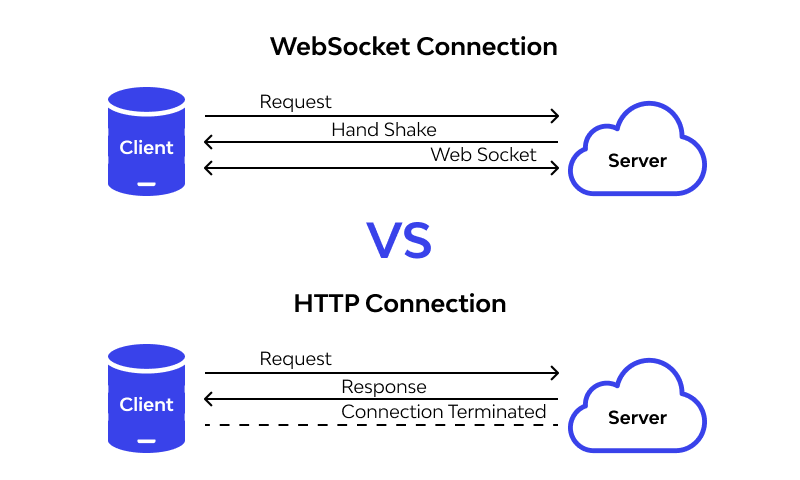
How Grizzly-WebSockets Works (Architecture Overview)
Grizzly-WebSockets is built on top of the Grizzly framework, which is designed to handle asynchronous, non-blocking I/O operations efficiently. Below is an overview of its architecture:
🧱 Key Components
- WebSocket Server:
- The server is responsible for managing WebSocket connections, handling message exchanges, and maintaining active sessions. Grizzly-WebSockets provides an easy way to create and configure WebSocket endpoints.
- WebSocket Client:
- WebSocket clients (usually browsers) initiate a connection to the WebSocket server. These clients maintain an open, persistent connection for continuous data exchange.
- Message Handlers:
- Grizzly-WebSockets supports the use of message handlers to define how messages should be processed. This includes handling incoming messages, broadcasting them to other clients, and managing message encoding/decoding.
- Grizzly NIO:
- Grizzly’s Non-blocking I/O (NIO) engine is leveraged to ensure that WebSocket connections are scalable and handle a large number of simultaneous client connections efficiently.
- Thread Management:
- Grizzly-WebSockets operates asynchronously, which means it can handle many connections without blocking threads. This results in high scalability and performance.
Data Flow
- A WebSocket client sends an initial handshake request to the server.
- If the server accepts the connection, the WebSocket protocol is upgraded to establish a full-duplex communication channel.
- Both the server and the client can send messages at any time over the same connection.
- Data frames are exchanged through a continuous, open channel, with the server pushing messages or events to connected clients in real-time.
Basic Workflow of Grizzly-WebSockets
Here’s a typical workflow for a Grizzly-WebSockets application:
1. Client Initiates Connection
- A WebSocket client (e.g., a browser or application) sends an HTTP request to the server, initiating a WebSocket handshake.
2. Handshake and Connection Upgrade
- If the server supports WebSockets, it responds with an HTTP 101 status code, agreeing to upgrade the connection from HTTP to WebSocket.
- The connection is then established and remains open for the duration of the session.
3. Message Exchange
- After the connection is established, both the server and client can send data in the form of frames.
- These messages can contain text, binary data, or control frames (such as ping/pong messages to keep the connection alive).
4. Message Handling
- Grizzly-WebSockets allows the server to process incoming messages asynchronously. Custom message handlers can be implemented to process incoming data and respond accordingly.
5. Broadcasting Messages
- Grizzly-WebSockets supports broadcasting, allowing the server to send a message to all connected clients or a specific subset (e.g., a chat room or game players).
6. Connection Termination
- Either the server or the client can initiate closing the WebSocket connection by sending a close frame. Once the connection is closed, resources are freed.
Step-by-Step Getting Started Guide for Grizzly-WebSockets
✅ Step 1: Set Up Your Grizzly Environment
- Add Dependencies:
- If you’re using Maven, add the following dependencies to your
pom.xml:
<dependency> <groupId>org.glassfish.grizzly</groupId> <artifactId>grizzly-websockets</artifactId> <version>2.4.4</version> </dependency> - If you’re using Maven, add the following dependencies to your
- Download Grizzly Framework:
- Alternatively, you can download the necessary Grizzly libraries from the official Grizzly website or Maven repository.
✅ Step 2: Create a WebSocket Server
- Initialize Grizzly Server:
- Use Grizzly’s HTTP server to initialize your WebSocket server.
import org.glassfish.grizzly.http.server.HttpServer; import org.glassfish.grizzly.websockets.WebSocketEngine; import org.glassfish.grizzly.websockets.WebSocketApplication; public class WebSocketServer { public static void main(String[] args) throws Exception { HttpServer server = HttpServer.createSimpleServer(); WebSocketEngine.getEngine().register("/", "/ws", new WebSocketApplication()); server.start(); System.out.println("WebSocket server started..."); } } - Define WebSocket Application:
- Extend
WebSocketApplicationto define the logic for handling incoming messages and sending responses.
import org.glassfish.grizzly.websockets.WebSocketApplication; import org.glassfish.grizzly.websockets.WebSocketChannel; public class WebSocketHandler extends WebSocketApplication { @Override public void onMessage(WebSocketChannel channel, String message) { // Handle incoming message channel.send("Received: " + message); } } - Extend
✅ Step 3: Create WebSocket Client
- Create Client Code:
- You can use JavaScript for a web client that connects to the Grizzly WebSocket server:
const socket = new WebSocket('ws://localhost:8080/ws'); socket.onopen = () => console.log('Connected to WebSocket server'); socket.onmessage = (event) => console.log('Message from server:', event.data); socket.send('Hello Server');
✅ Step 4: Test and Deploy
- Test Your Application:
- Run the server and the client. Ensure that the WebSocket connection is established and messages are exchanged correctly.
- Verify that the server can broadcast messages and handle multiple connections.
- Deploy:
- Once your application is tested, you can deploy it to a production environment.
