Document Object Model
- The Document Object Model (DOM) is an Application Programming Interface (API) for HTML and XML documents.
- With the Document Object Model, programmers can create and build documents, navigate their structure, and add, modify, or delete elements and content.
- The DOM is an object-oriented representation of the web page, which can be modified with a scripting language such as JavaScript.
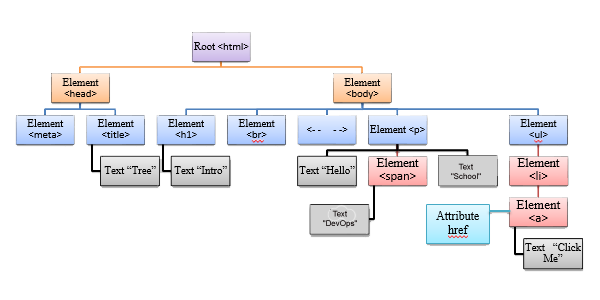
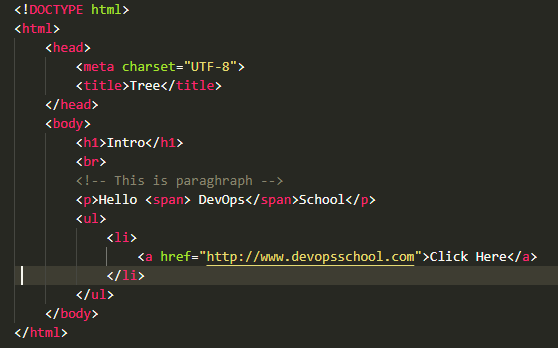
- The DOM model represents a document with a logical tree.
- According to Document Object Model (DOM), every HTML-tag is an object. Nested tags are called “children” of the enclosing one. All operations on the DOM start with the document object. From it, we can access any node.
- The Document Object Model can be used with any programming language.
DOM Levels
- DOM Level 0 – This level supports the common document object collections – form[ ], image[ ], anchors[ ], links[ ] and applets[ ]. This is also known as classic or traditional JavaScript Object Model. •
- DOM Level 1- It provides the ability to manipulate all elements in a document through a common set of functions. In this level, all elements are exposed and parts of the page can be read and written to at all times.
- DOM Level 2 – It provides further access to page elements primarily related to CSS and focuses on combining Level 0 and Level 1 while adding improved support for working with XML documents.
DOM Levels
- DOM Level 3 – Enhanced Level of Level 1 and Level 2 and added support for XPath and keyboard event handling.
- DOM Level 4 – Enhanced year 2015
Categories of DOM
- DOM Core – It specifies a generic model for viewing and manipulating a marked-up document as a tree structure.
- DOM HTML – It specifies an extension to the core DOM for use with HTML. This represents DOM Level 0 with capabilities for manipulating all of the HTML element objects.
- DOM CSS – It specifies the interfaces necessary to manipulate CSS rules programmatically.
- DOM Events – It adds event handling to the DOM.
- DOM XML – It specifies an extension to the Core Dom for use with XML.
Document Tree
DOM Node Types
| Constant | Node Type | Description |
| Node.ELEMENT_NODE | 1 | An element such as <h1> or <div> |
| Node.TEXT_NODE | 3 | The actual Text of Element or Attribute ex: – “Hello” |
| Node.PROCESSING_INSTRUCTION_NODE | 7 | An instruction to a parser on aspect of the document <?xml version=“1.0”?> |
| Node.COMMENT_NODE | 8 | A comment such as < – – Something – – > |
| Node.DOCUMENT_NODE | 9 | A Document Node |
| Node.DOCUMENT_TYPE_NODE | 10 | A doctype statement <!DOCTYPE html> |
| Node.DOCUMENT_FRAGMENT_NODE | 11 | A document fragment, which represents a lightweight structure to hold a collection of DOM nodes for manipulation or insertion. |
Node Relationship
- Parent
- Children
- First Child
- Previous Sibling
- Next Sibling
- Last child
DOM Node Properties
| Properties | Description |
| nodeName | Contains the name of the node |
| nodeValue | Contains the value within the node; generally only applicable to text nodes |
| nodeType | Holds a number corresponding to the type of node |
| parentNode | Reference to the parent node of the element, if one exists |
| childNodes | Access to the list of child nodes |
| firstChild | Reference to the first child node of the element, if one exists |
| lastChild | Points to the last child node of the element, if one exists |
| previousSibling | Reference to the previous sibling of the node; for example, if its parent node has multiple children |
| nextSibling | Reference to the next sibling of the node; for example, if its parent node has multiple children |
| attributes | The list of the attributes for the element |
| ownerDocument | Points to the HTML Document object in which the element is contained |

Latest posts by rajeshkumar (see all)