Error
java.lang.UnsupportedOperationException: no known implementation of class hudson.model.ParameterDefinition is named ChoiceParameter
	at org.jenkinsci.plugins.structs.describable.DescribableModel.resolveClass(DescribableModel.java:549)
	at org.jenkinsci.plugins.structs.describable.DescribableModel.coerce(DescribableModel.java:473)
	at org.jenkinsci.plugins.structs.describable.DescribableModel.coerceList(DescribableModel.java:585)
	at org.jenkinsci.plugins.structs.describable.DescribableModel.coerce(DescribableModel.java:458)
	at org.jenkinsci.plugins.structs.describable.DescribableModel.buildArguments(DescribableModel.java:409)
	at org.jenkinsci.plugins.structs.describable.DescribableModel.instantiate(DescribableModel.java:329)
Caused: java.lang.IllegalArgumentException: Could not instantiate {parameterDefinitions=[{$class=ChoiceParameter, choiceType=PT_SINGLE_SELECT, description=Select Build Type, name=build_type, randomName=choice-parameter-5631314439613978, script={$class=GroovyScript, fallbackScript={classpath=[], sandbox=true, script=return['Could not get build type']}, script={classpath=[], sandbox=true, script=
Solution
INSTALL THESE PLUGINS
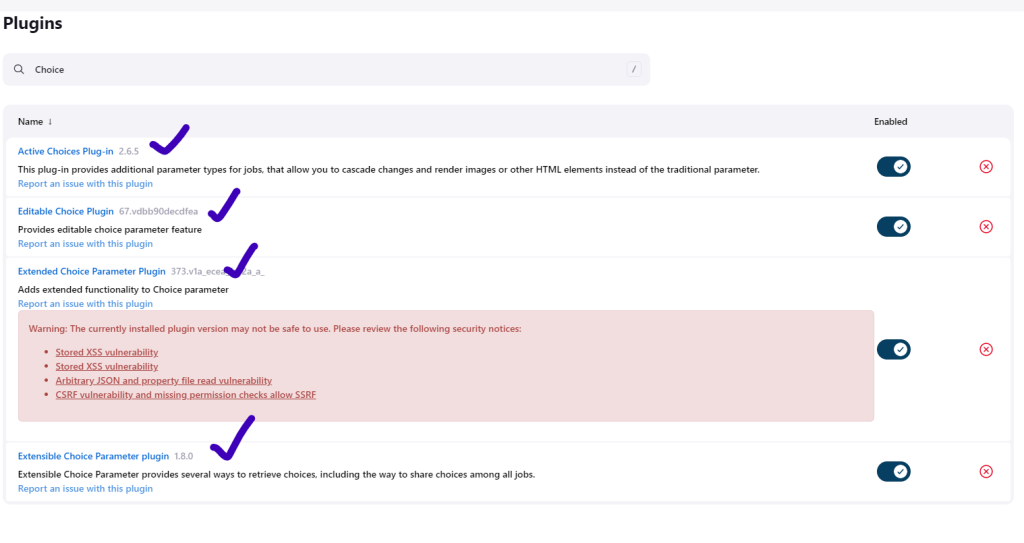
To use the ChoiceParameter in a Jenkins pipeline, you need to install the “Extended Choice Parameter” plugin. This plugin provides additional parameter types, including the choice parameter.
To install the “Extended Choice Parameter” plugin in Jenkins, follow these steps:
- Access the Jenkins web interface.
- Click on “Manage Jenkins” on the left sidebar.
- Select “Manage Plugins” from the dropdown menu.
- In the “Available” tab, search for “Extended Choice Parameter” in the search box.
- Check the checkbox next to the “Extended Choice Parameter” plugin.
- Click on the “Install without restart” button.
After the plugin is installed, you should be able to use the ChoiceParameter in your Jenkins pipeline by specifying the parameter type as “Choice Parameter” and providing the necessary configuration.

Latest posts by rajeshkumar (see all)