Introduction
Mobile Device Management (MDM) is a security and administration technology that allows IT departments to monitor, manage, and secure mobile devices—such as smartphones, tablets, and sometimes laptops—that are used within an organization. By utilizing a combination of device-level software and cloud-based configurations, MDM provides a centralized console where admins can push security policies, install applications, and protect corporate data. In an era where “the office” is wherever an employee happens to be, MDM acts as the digital tether that ensures those remote connections remain secure and compliant.
The importance of MDM cannot be overstated in the modern cybersecurity landscape. Without it, a lost phone containing corporate emails or sensitive client data is a catastrophic liability. Key real-world use cases include automated “Zero-Touch” enrollment (where a device configures itself out of the box), remote wiping of stolen hardware, enforcing encryption and passcodes, and segregating personal and business data on Bring Your Own Device (BYOD) phones. When choosing a tool, users should evaluate platform breadth (iOS vs. Android vs. Windows), ease of enrollment, integration with Identity Providers (IdP), and the ability to scale as the workforce grows.
Best for: IT Managers, Security Officers, and business owners in mid-to-large enterprises, specifically in sectors like healthcare, retail, education, and logistics where mobile work is the norm. It is essential for any company handling sensitive data or managing a fleet of tablets (kiosks) and ruggedized handhelds.
Not ideal for: Very small teams (under 5-10 people) who only use a few basic apps and have no strict regulatory compliance needs. In these cases, built-in features like Apple’s “Find My” or Google’s basic workspace security may be sufficient without the overhead of a dedicated MDM license.
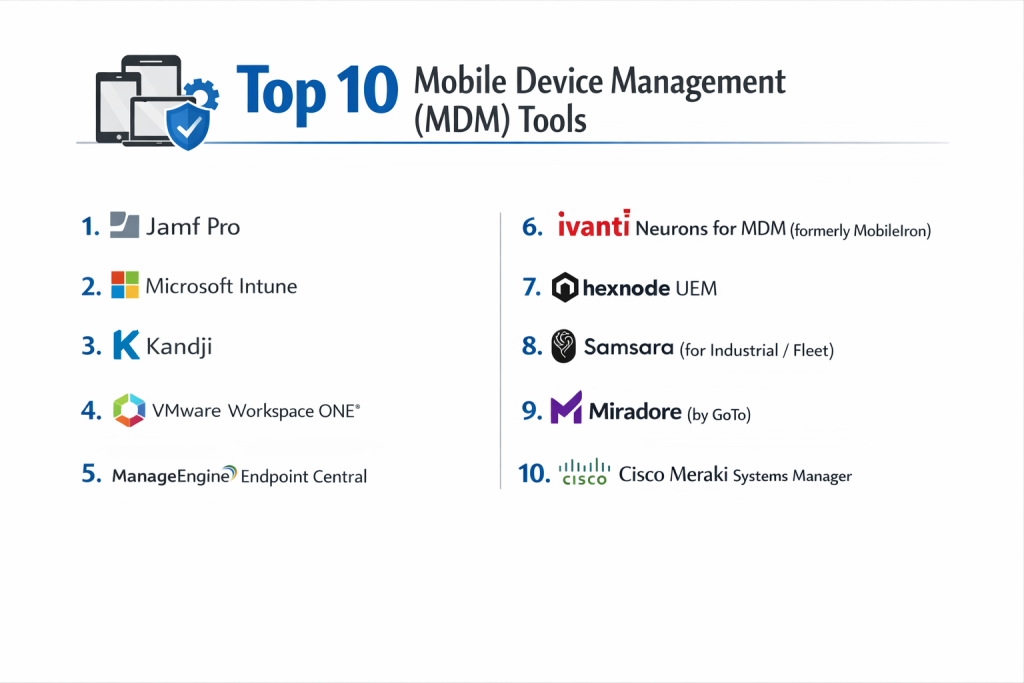
Top 10 Mobile Device Management (MDM) Tools
1 — Microsoft Intune
Microsoft Intune is a powerhouse in the MDM space, primarily because it is part of the broader Microsoft Endpoint Manager and integrated directly into the Microsoft 365 ecosystem.
- Key features:
- Conditional Access: Only allows healthy, compliant devices to access Outlook, Teams, and SharePoint.
- App Protection Policies: Secures corporate data at the app level without managing the user’s entire personal phone.
- Autopilot & Zero-Touch: Automated deployment for Windows, Android (Enterprise), and Apple (ADE).
- Cross-Platform Management: Full support for iOS, iPadOS, Android, macOS, Windows, and Linux.
- Microsoft Defender Integration: Seamless connection with Microsoft’s endpoint security stack.
- Certificate-Based Authentication: Deploys WiFi and VPN profiles automatically.
- Advanced Reporting: Deep analytics on device compliance and update status.
- Pros:
- If you are already paying for Microsoft 365 E3 or E5, you likely already own it, making it highly cost-effective.
- Unmatched integration with Azure Active Directory (Entra ID) for identity-based security.
- Cons:
- The administrative interface is notoriously complex and can be overwhelming for beginners.
- Apple-specific management is good, but not as “day-zero” refined as specialized Apple-only tools.
- Security & compliance: SOC 2, ISO 27001, HIPAA, GDPR, FedRAMP High, and FIPS 140-2.
- Support & community: Massive global community, extensive documentation, and premium enterprise support.
2 — Jamf Pro
Jamf is the undisputed gold standard for Apple-centric organizations. It is designed to provide the most “Apple-like” experience for both admins and end-users.
- Key features:
- Apple Business Manager (ABM) Integration: Seamless zero-touch deployment for Macs, iPhones, and iPads.
- Self Service App Store: A branded portal where employees can download approved apps and run scripts.
- Smart Groups: Automated device categorization based on hundreds of criteria (OS version, battery health, etc.).
- Jamf Connect: Syncs Mac login passwords with cloud identity providers like Okta or Azure.
- Configuration Profiles: Granular control over every Apple setting, from wallpaper to kernel extensions.
- Policy Management: Complex automation scripts that trigger based on device events.
- App Lifecycle Management: Automated patching and updating of App Store and third-party apps.
- Pros:
- “Day-zero” support for every new Apple OS update; you can manage new features the moment they launch.
- The most powerful scripting and automation engine for macOS on the market.
- Cons:
- Does not support Android or Windows; you need a second tool for a mixed-fleet environment.
- Higher price point than most “generalist” MDM solutions.
- Security & compliance: SOC 2 Type II, ISO 27001, GDPR, and HIPAA.
- Support & community: Jamf Nation is the largest Apple IT community in the world.
3 — Kandji
Kandji is a modern, cloud-native Apple management platform built for speed and simplicity. It focuses on “compliance-as-code” and ease of deployment.
- Key features:
- Compliance Blueprints: Pre-built security templates (NIST, CIS) that can be applied with one click.
- Auto-Apps: Automatically keeps over 150 popular third-party apps (Chrome, Slack, Zoom) updated.
- Self-Healing Agents: If a user deletes a required profile, Kandji automatically re-installs it.
- Kandji Passport: Elegant Mac login screen that integrates with your SSO provider.
- Declarative Device Management (DDM): Leverages Apple’s newest management framework for faster response times.
- Zero-Touch Provisioning: Full support for Apple’s automated enrollment.
- Clean UI: One of the most intuitive dashboards in the IT industry.
- Pros:
- Perfect for fast-growing startups that need to secure a fleet of Macs in minutes, not days.
- The “Self-Healing” feature significantly reduces help desk tickets related to configuration drift.
- Cons:
- Like Jamf, it is strictly limited to Apple devices (no Android/Windows).
- Less “custom script” flexibility compared to Jamf Pro, as it prioritizes pre-built automation.
- Security & compliance: SOC 2 Type II, HIPAA, and GDPR compliant.
- Support & community: High-touch customer success and extensive technical documentation.
4 — VMware Workspace ONE
Workspace ONE (powered by AirWatch) is a “Unified Endpoint Management” (UEM) platform that focuses on the digital employee experience across any device type.
- Key features:
- Any Device, Any App: Manages iOS, Android, Windows 10/11, macOS, Chrome OS, and even Linux.
- Intelligent Hub: A unified app where employees find all their work apps, notifications, and people.
- Zero Trust Security: Continuously verifies device posture before allowing access to internal resources.
- Remote Assist: Integrated tool for IT to remotely view and control mobile screens for support.
- Telecom Management: Tracks data usage and roaming for corporate-owned cellular plans.
- VDI Integration: Deep hooks into VMware Horizon for virtual desktop management.
- Advanced Orchestration: Automates complex workflows across IT and Security teams.
- Pros:
- One of the few platforms that truly treats a Windows laptop and an Android phone with equal depth.
- Excellent for large enterprises that need to manage “rugged” devices in warehouses or retail.
- Cons:
- The platform is massive and can be highly complex to set up and navigate.
- Can be very expensive depending on the number of “intelligence” modules added.
- Security & compliance: FedRAMP, SOC 2, ISO 27001, HIPAA, and GDPR.
- Support & community: Global enterprise support and a large network of certified partners.
5 — ManageEngine Endpoint Central
Endpoint Central is a comprehensive, all-in-one management tool that offers a massive feature set at a very competitive price point.
- Key features:
- Hybrid MDM: Manages mobile devices alongside traditional desktops and servers.
- OS Deployment: Images Windows machines while simultaneously managing iPads.
- Modern Management: Bridges the gap between old GPO-style management and modern MDM.
- Remote Troubleshooting: High-performance remote control for mobile and desktop.
- USB Device Management: Controls which peripherals can be plugged into endpoints.
- Geofencing: Triggers alerts or wipes if a device leaves a specific geographic area.
- Kiosk Mode: Locks tablets down to a single app for retail or public use.
- Pros:
- Incredible value for money; offers features typically found in much more expensive suites.
- Supports an enormous range of platforms, including Chrome OS and Linux.
- Cons:
- The UI feels dated and cluttered compared to “Apple-first” or modern SaaS rivals.
- Setup can be cumbersome as it includes many legacy “Desktop Management” components.
- Security & compliance: ISO 27001, SOC 2, HIPAA, GDPR, and PCI DSS.
- Support & community: Vast library of video tutorials and a large, global user base.
6 — Mosyle (Business / Fuse)
Mosyle is a disruptor in the Apple MDM space, offering a very high-end feature set (including integrated antivirus) at a lower cost than Jamf.
- Key features:
- Integrated Endpoint Security: Combines MDM with Apple-specific antivirus and ransomware protection.
- Mosyle Auth: SSO for Mac login with support for Google, Microsoft, Okta, and Ping.
- Application Management: Automated installation and patching for non-App Store apps.
- Scripting Library: Hundreds of pre-made scripts for macOS and iOS management.
- Admin On-Demand: Allows users to request temporary local admin rights for specific tasks.
- Zero-Touch Deployment: Full integration with Apple Business Manager.
- Multi-Tenant Management: Ideal for MSPs or large companies with multiple sub-entities.
- Pros:
- The “Fuse” version offers a combined Security + MDM stack that is very powerful.
- Pricing is extremely aggressive, making it a favorite for budget-conscious Apple shops.
- Cons:
- Support is primarily ticket-based (no phone support for lower tiers).
- UI is functional but not as polished or “modern” as Kandji.
- Security & compliance: SOC 2 Type II, GDPR, and HIPAA.
- Support & community: High-quality technical documentation and a growing user base.
7 — Ivanti Neurons for MDM (formerly MobileIron)
Ivanti Neurons is a robust, enterprise-focused UEM solution that excels in high-security environments and complex mobile deployments.
- Key features:
- Mobile@Work: A specialized agent that ensures corporate data is encrypted on the device.
- Zero Sign-On: Uses the device as the identity, eliminating the need for passwords.
- App Tunneling: Securely connects mobile apps to behind-the-firewall data without a full VPN.
- Threat Defense: Built-in mobile threat defense (MTD) to detect “man-in-the-middle” attacks.
- Multi-OS Support: Equal focus on Android Enterprise and Apple iOS.
- Automation Engine: Triggers compliance actions based on real-time device signals.
- Detailed Inventory: Extensive reporting on hardware, software, and network connectivity.
- Pros:
- Strong history in government and regulated industries with high security standards.
- Excellent at “App Tunneling,” which is vital for secure access to internal company portals.
- Cons:
- The transition from MobileIron to Ivanti has resulted in some interface inconsistencies.
- Can be heavy-handed and complex for smaller, simpler deployments.
- Security & compliance: FedRAMP, SOC 2, ISO 27001, FIPS 140-2, and GDPR.
- Support & community: Global enterprise support and specialized training programs.
8 — SOTI MobiControl
SOTI is the market leader for “purpose-built” and ruggedized device management, widely used in trucking, warehousing, and retail.
- Key features:
- SOTI XTreme Technology: Optimized data transfer for updating devices over slow, remote networks.
- Remote Control: The fastest remote view/control for Android and Windows CE devices.
- SOTI Surf: A secure managed browser for accessing internal web apps.
- Staging & Provisioning: Quickly set up thousands of devices via barcode scanning.
- Asset Tracking: Advanced location services and historical breadcrumbing.
- Scripting Engine: Deep support for JavaScript to automate complex device behaviors.
- Device Health Dashboard: Monitors battery life and signal strength for field fleets.
- Pros:
- If you manage Zebra printers, handheld scanners, or rugged tablets, SOTI is unrivaled.
- Superior remote support tools that allow IT to see exactly what a driver or warehouse worker sees.
- Cons:
- The interface is very “industrial” and lacks the sleekness of modern office MDMs.
- Not as specialized for “modern” macOS or Windows office management.
- Security & compliance: ISO 27001, SOC 2, and GDPR.
- Support & community: 24/7 global support and a very strong partner network for hardware.
9 — Samsung Knox Manage
Knox Manage is a cloud-based MDM solution optimized for Samsung Galaxy devices, though it does support other Androids and iOS.
- Key features:
- Deep Knox Integration: Access to hardware-level security features unique to Samsung.
- Knox Mobile Enrollment: Automated out-of-the-box deployment for Samsung devices.
- Containerization: Strong separation of work and personal apps via Knox Platform for Enterprise.
- Remote Support: Integrated tool for viewing and controlling Galaxy devices remotely.
- Kiosk Mode: Highly customizable lockdown for digital signage and retail.
- Event-Based Management: Triggers actions based on time, location, or network status.
- Cross-Platform: Basic management for iOS and Windows.
- Pros:
- The most secure choice for organizations that have standardized on Samsung hardware.
- Low cost of entry for small businesses using Samsung business bundles.
- Cons:
- iOS and Windows management is basic; it lacks the depth of Intune or Jamf.
- Most effective only when paired with the premium Knox hardware features.
- Security & compliance: FIPS 140-2, Common Criteria, GDPR, and HIPAA.
- Support & community: Dedicated Samsung business support and extensive partner training.
10 — Hexnode UEM
Hexnode is a rising star known for its ease of use and its “Kiosk Mode” capabilities, serving a wide range of industries globally.
- Key features:
- Multi-Platform Support: iOS, Android, Windows, macOS, Fire OS, and Apple TV.
- Advanced Kiosk Mode: Locks devices to single or multi-app modes with custom branding.
- Expense Management: Tracks data usage and sets limits to avoid overage charges.
- Dynamic Groups: Automates policy assignments based on device or user attributes.
- Web Filtering: Blocks inappropriate or insecure websites at the device level.
- Remote View/Control: Supports remote support for Android and Windows.
- Zero-Touch Deployment: Full support for ABM, Knox, and Android Zero Touch.
- Pros:
- One of the best tools for managing “non-traditional” devices like Fire OS tablets and Apple TVs.
- Pricing is very flexible, offering various tiers to fit different business sizes.
- Cons:
- Advanced features are only available in higher-priced tiers.
- Reporting and analytics are functional but not as deep as enterprise-level tools like Ivanti.
- Security & compliance: SOC 2, HIPAA, and GDPR.
- Support & community: 24/5 live chat support and a very responsive help desk.
Comparison Table
| Tool Name | Best For | Platform(s) Supported | Standout Feature | Rating (Gartner) |
| Microsoft Intune | M365 Ecosystem | All (incl. Windows/Linux) | Conditional Access | 4.4 / 5 |
| Jamf Pro | Apple Power Users | Apple only | Smart Groups | 4.7 / 5 |
| Kandji | Apple Startups | Apple only | Self-Healing Agent | 4.8 / 5 |
| Workspace ONE | Enterprise UEM | All Platforms | Intelligent Hub | 4.3 / 5 |
| ManageEngine | High Feature Value | All + IoT | Integrated Desktop Mgmt | 4.4 / 5 |
| Mosyle | Budget Apple | Apple only | Integrated Antivirus | 4.6 / 5 |
| Ivanti Neurons | High Security | iOS, Android, Win | App Tunneling | 4.2 / 5 |
| SOTI MobiControl | Rugged/Logistics | Android, Win, iOS | Remote Control Speed | 4.3 / 5 |
| Knox Manage | Samsung Users | Android (Primary), iOS | Knox Hardware Security | 4.1 / 5 |
| Hexnode UEM | Kiosks / Ease of Use | All + Fire OS | Multi-Platform Kiosk | 4.5 / 5 |
Evaluation & Scoring of MDM Tools
| Category | Weight | Score (Avg) | Evaluation Notes |
| Core Features | 25% | 9.4 / 10 | Most tools now offer the “basics” as standard. |
| Ease of Use | 15% | 8.2 / 10 | Kandji and Hexnode lead; Intune is the most difficult. |
| Integrations | 15% | 8.8 / 10 | M365 and SSO integration are key differentiators. |
| Security & Compliance | 10% | 9.6 / 10 | High across the board due to nature of the software. |
| Performance | 10% | 9.1 / 10 | Agent “lightness” and scan frequency are critical. |
| Support & Community | 10% | 8.5 / 10 | Jamf Nation and Microsoft Learn are industry leaders. |
| Price / Value | 15% | 8.4 / 10 | Mosyle and ManageEngine provide the most for less. |
Which MDM Tool Is Right for You?
Solo Users vs SMB vs Mid-market vs Enterprise
- Solo/Freelance: You likely don’t need a dedicated MDM. Use basic built-in device tracking.
- SMB (10–100 Devices): Kandji (for Macs) or Hexnode (for mixed) are excellent. They don’t require a full-time dedicated administrator to keep running.
- Mid-market (100–1,000 Devices): Microsoft Intune or Mosyle are the heavy hitters here. They offer the governance needed for a large team without the massive complexity of an enterprise “AirWatch” style deployment.
- Enterprise (1,000+ Devices): Workspace ONE or Ivanti are the primary choices. These tools are built to handle the complexity of different global regions, thousands of device variants, and deep security integrations.
Budget-conscious vs Premium Solutions
If you are on a strict budget, Mosyle (for Apple) or ManageEngine are the clear winners. If you prioritize “Day-zero” features and the best possible user experience, paying the premium for Jamf or Kandji is usually worth it in reduced support tickets.
Feature Depth vs Ease of Use
If you need to manage complex warehouse scanners and custom Android builds, you need the depth of SOTI. If you just want to make sure your remote employees have Slack and Zoom installed with a secure password, the ease of Kandji or Hexnode is much more efficient.
Integration and Scalability Needs
For companies already paying for Microsoft 365, the “native” integration of Intune is almost impossible to ignore. However, if you are a “best-of-breed” shop using Okta, Slack, and Google Workspace, a tool like Jamf or Workspace ONE often integrates better with those third-party services.
Frequently Asked Questions (FAQs)
1. What is the difference between MDM and MAM?
MDM (Mobile Device Management) manages the entire device, including settings and hardware. MAM (Mobile Application Management) only manages specific apps and the data inside them. MAM is popular for personal phones where you don’t want to control the user’s photos, but do want to secure company email.
2. Can an MDM see my personal photos or text messages?
No. Modern MDM frameworks (especially Apple and Android Enterprise) are designed to protect privacy. Admins can see things like device name, battery, and installed apps, but they cannot access your private photos, personal messages, or browser history.
3. Does MDM work if the device is not on the company network?
Yes. Modern MDM tools are cloud-based. As long as the phone or tablet has an internet connection (WiFi or Cellular), it can receive security updates and commands from the central console.
4. How much does MDM software typically cost?
Pricing is usually “per device” or “per user.” Most tools range from $2 to $8 per device, per month. Some enterprise suites are sold as part of larger security bundles.
5. What is “Zero-Touch Enrollment”?
It is a process where a device is pre-registered to your company by the vendor (like Apple or Verizon). When the employee unboxes it and connects to WiFi, the device automatically downloads its MDM profile without the IT team ever touching it.
6. Can MDM track a device’s location?
Yes, but most platforms allow you to disable this for privacy. Typically, location tracking is used for “Lost Mode” only, where the location is only revealed once the device has been reported as stolen.
7. Do I need an MDM for work-from-home employees?
Absolutely. In many ways, they need it more than office workers. MDM ensures that even if they are on a home network, their device is encrypted and their access to company data is secure.
8. Can I manage both Macs and PCs with the same tool?
Yes, “Unified Endpoint Management” (UEM) tools like Intune, Workspace ONE, and ManageEngine can manage both. However, Apple-only tools (Jamf, Kandji) offer deeper features for Macs specifically.
9. What happens if I “Unenroll” from an MDM?
Usually, the corporate data (emails, work apps, VPN profiles) is automatically wiped from the device. This “Selective Wipe” ensures the company stays safe while leaving your personal data intact.
10. Why is “Kiosk Mode” important?
Kiosk mode locks a tablet to one specific app. This is vital for retail check-out stands, hospital check-in tablets, or digital signage, as it prevents users from surfing the web or changing settings.
Conclusion
The “best” Mobile Device Management tool is the one that fits your hardware choices and your administrative capacity. If you are a 100% Apple shop, Jamf and Kandji are the gold standards. If you are a global enterprise with a mix of everything, Microsoft Intune or Workspace ONE are the only tools with the scale to support you.
Choosing an MDM is about finding a balance between security and user privacy. By picking the right tool from this list, you aren’t just locking down devices; you are empowering your employees to work safely from anywhere in the world.

- Top 10 Email Deliverability Tools: Features, Pros, Cons & Comparison - September 6, 2026
- Top 10 Pharmacovigilance Software: Features, Pros, Cons & Comparison - September 6, 2026
- Top 10 Manufacturing Execution Systems (MES) - July 30, 2026