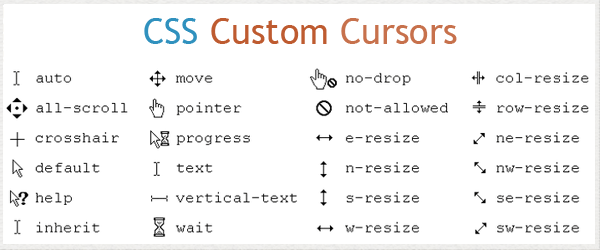
When You create a WebPage using HTML & CSS then you can change the cursor property using CSS as you wish. So, Some below Cursor Property for using-
Cursor–
- default – The default cursor
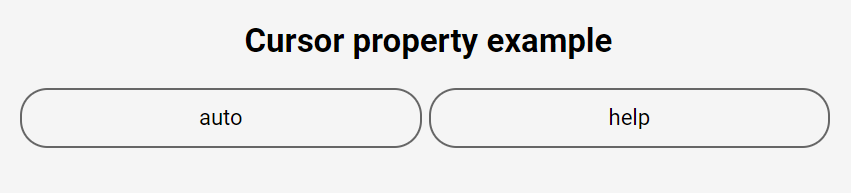
- auto – Default. The browser sets a cursor
- all-scroll – The cursor indicates that something can be scrolled in any direction
- none – No cursor is rendered for the element
- not-allowed – The cursor indicates that the requested action will not be executed
- text – The cursor indicates text that may be selected
- URL – A comma separated list of URLs to custom cursors. Always specify a generic cursor at the end of the list, in case none of the URL-defined cursors can be used
- row-resize – The cursor indicates that the row can be resized vertically
- s-resize – The cursor indicates that an edge of a box is to be moved down (south)
- se-resize – The cursor indicates that an edge of a box is to be moved down and right (south/east)
- sw-resize – The cursor indicates that an edge of a box is to be moved down and left (south/west)
- n-resize – The cursor indicates that an edge of a box is to be moved up (north)
- ne-resize – The cursor indicates that an edge of a box is to be moved up and right (north/east)
- nesw-resize – Indicates a bidirectional resize cursor
- ns-resize – Indicates a bidirectional resize cursor
- nw-resize – The cursor indicates that an edge of a box is to be moved up and left (north/west)
- nwse-resize – Indicates a bidirectional resize cursor
- copy – The cursor indicates something is to be copied
- alias – The cursor indicates an alias of something is to be created
- e-resize – The cursor indicates that an edge of a box is to be moved right (east)
- ew-resize – Indicates a bidirectional resize cursor
- pointer – The cursor is a pointer and indicates a link
- progress – The cursor indicates that the program is busy (in progress)
- zoom-out – The cursor indicates that something can be zoomed out
- zoom-in – The cursor indicates that something can be zoomed in
- vertical-text – The cursor indicates vertical-text that may be selected
- w-resize – The cursor indicates that an edge of a box is to be moved left (west)
- wait – The cursor indicates that the program is busy
- context-menu – The cursor indicates that a context-menu is available
- col-resize – The cursor indicates that the column can be resized horizontally
- cell – The cursor indicates that a cell (or set of cells) may be selected
- no-drop – The cursor indicates that the dragged item cannot be dropped here
- crosshair – The cursor render as a crosshair
- grab – The cursor indicates that something can be grabbed
- grabbing – The cursor indicates that something can be grabbed
- help – The cursor indicates that help is available
- move – The cursor indicates something is to be moved


Latest posts by rajeshkumar (see all)