AWS VPC Networking Components: Complete Guide
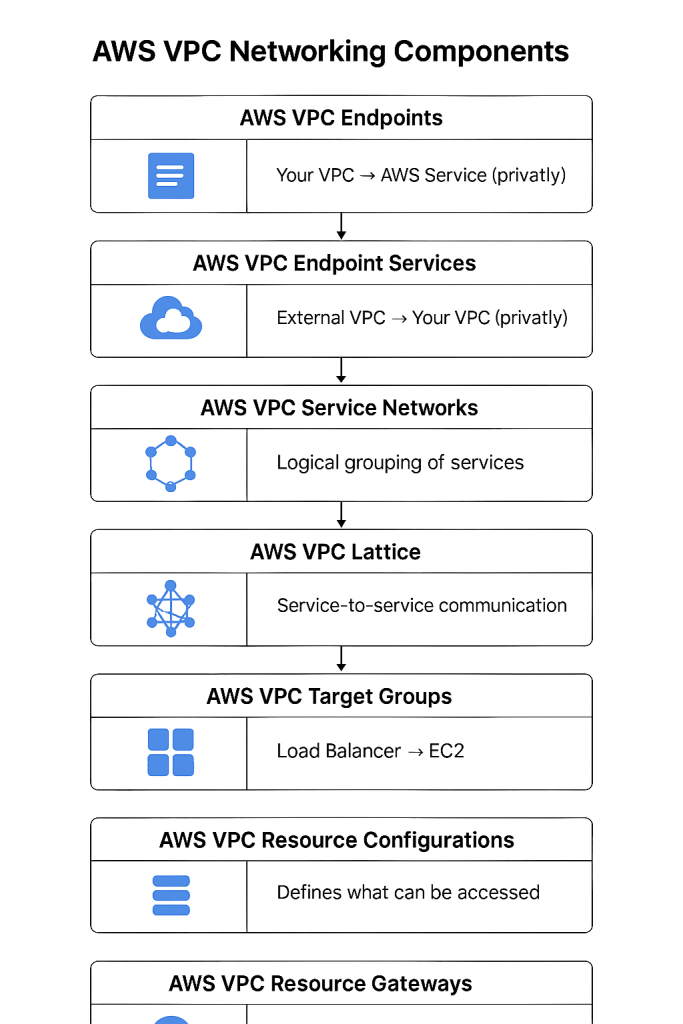
Let’s simplify the networking scope of each AWS component to help you quickly understand what traffic they manage and what networks they interact with.
✅ 1. AWS VPC Endpoints
- Scope: Within your VPC to AWS-managed services (like S3, DynamoDB).
- Networking: Internal VPC traffic only → no public internet involved.
- Direction: VPC → AWS service (e.g., S3) privately.
- Example: EC2 in private subnet accesses S3 bucket without using Internet Gateway or NAT.
✅ 2. AWS VPC Endpoint Services (PrivateLink)
- Scope: From external VPCs into your VPC-hosted service via PrivateLink.
- Networking: Secure, private network between VPCs (not over internet).
- Direction: Other VPCs → your app/service in your VPC.
- Example: A SaaS provider exposes their service to customer VPCs privately.
✅ 3. AWS VPC Service Networks (Lattice)
- Scope: Logical grouping of services across VPCs/accounts using Lattice.
- Networking: Controls which services can talk to each other.
- Direction: Internal cross-VPC traffic among microservices.
- Example: Group frontend and backend services from different VPCs and manage access policies.
✅ 4. AWS VPC Lattice Services
- Scope: Service-to-service communication across VPCs/accounts.
- Networking: Application-level mesh; integrates with IAM, routing, and observability.
- Direction: Service A (VPC-A) ↔ Service B (VPC-B), via VPC Lattice.
- Example: A microservice in one VPC securely communicates with a database service in another VPC.
✅ 5. AWS VPC Target Groups
- Scope: Internal to your VPC or cluster (EC2, ECS, Lambda).
- Networking: Handles traffic routing from load balancers to registered targets.
- Direction: Load Balancer → EC2/Containers/Lambda.
- Example: ALB routes requests to backend EC2s in the same VPC.
✅ 6. AWS VPC Resource Configurations
- Scope: Defines what resources (in your VPC) are sharable.
- Networking: Configuration-level, no direct traffic handling. Works with Resource Gateways.
- Direction: Passive — describes resources that can be accessed.
- Example: Mark a database as shareable to another VPC.
✅ 7. AWS VPC Resource Gateways
- Scope: Acts as entry point to access resources defined in Resource Configurations.
- Networking: Cross-VPC/account access gateway into your VPC.
- Direction: External VPCs → Resource in your VPC (via gateway).
- Example: Gateway allows secure access to your analytics API for a partner VPC.
🧭 Visual Summary Table Networking Scope
| Service | Traffic Type | Scope | Direction / Flow |
|---|---|---|---|
| VPC Endpoints | AWS Service Access | Internal VPC | Your VPC → AWS Service (privately) |
| VPC Endpoint Services | PrivateLink Service Sharing | Cross-VPC | External VPC → Your VPC (privately) |
| VPC Service Networks | Microservices Management | Cross-VPC / Multi-account | Logical grouping of services |
| VPC Lattice Services | App-level Service Mesh | Cross-VPC / Multi-account | VPC-A ↔ VPC-B services (via Lattice) |
| VPC Target Groups | Load Balancing Targets | Internal VPC | Load Balancer → EC2/Containers/Lambda |
| Resource Configurations | Shareable Resource Metadata | Your VPC | Defines what can be accessed |
| Resource Gateways | Access Point to Resources | Cross-VPC | External VPCs → Resource in your VPC |
This guide provides a comprehensive overview of key AWS VPC networking services including their definitions, benefits, use cases, practical scenarios, and interdependencies.
1. AWS VPC Endpoints
Definition:
AWS VPC Endpoints allow private connections between your VPC and supported AWS services without requiring internet access, NAT devices, or VPNs.
Types:
- Interface Endpoints: Elastic Network Interfaces (ENIs) with private IPs.
- Gateway Endpoints: For S3 and DynamoDB.
Benefits:
- Increased security (no exposure to the public internet)
- Reduced data transfer costs
- Simplified routing
Use Cases:
- Access S3 privately from EC2 in a private subnet
- Access DynamoDB securely from a Lambda function
- Use VPC endpoint to connect to API Gateway privately
- Private access to AWS KMS for encryption
- Reduce NAT Gateway cost by accessing services through endpoints
2. AWS VPC Endpoint Services (PrivateLink)
Definition:
Allows you to expose your own applications/services running in VPC to consumers in other VPCs using PrivateLink.
Benefits:
- Secure service exposure
- Simplified network setup for consumers
- No need for transit gateways or peering
Use Cases:
- Provide a managed database service to other accounts
- SaaS provider exposing ML APIs to customer VPCs
- Offer logging services to multiple client accounts
- Share internal APIs with dev/test teams securely
- ISV offering product services on AWS Marketplace
3. AWS VPC Service Networks (Lattice)
Definition:
Service networks are logical groupings of services exposed through VPC Lattice, providing simplified policy enforcement and routing.
Benefits:
- Logical grouping of services
- Centralized policy management
- Better organization for large systems
Use Cases:
- Group dev environment microservices
- Isolate backend services by domain (auth, billing)
- Implement consistent auth policy across services
- Enable internal-only access across multiple accounts
- Monitor traffic within a group of services
4. AWS VPC Lattice Services
Definition:
Fully managed application-layer networking service that connects, secures, and monitors communication between services across VPCs/accounts.
Benefits:
- Simplified service-to-service connectivity
- Native traffic routing, security, observability
- No custom mesh setup required
Use Cases:
- Microservices communication across multiple VPCs
- Centralized auth between services
- Observability for inter-service traffic
- Connect frontend apps to backend APIs securely
- Migrate from self-managed service mesh to Lattice
5. AWS VPC Target Groups
Definition:
Target groups are used in conjunction with Elastic Load Balancers to route traffic to one or more registered targets (EC2, IPs, Lambda).
Benefits:
- Flexible routing
- Dynamic target registration
- Supports health checks and failover
Use Cases:
- Distribute web traffic across EC2 instances
- Blue/green deployment using separate target groups
- Route different APIs to different backend services
- Load balance Lambda functions
- Route traffic to containers in ECS
6. AWS VPC Resource Configurations
Definition:
Defines specific resources or groupings of resources within your VPC that you want to make accessible to other VPCs/accounts securely.
Types:
- Single
- Group
- Child
- ARN-based
Benefits:
- Granular resource sharing
- Easier management in multi-account setup
- Centralized configuration
Use Cases:
- Share an internal dashboard with a partner account
- Provide secure access to an RDS cluster
- Expose only specific APIs to consumers
- Allow limited access to SFTP servers
- Define resource groups for automated policy application
7. AWS VPC Resource Gateways
Definition:
Gateways that act as entry points to access resources defined in resource configurations. Controls how clients access the shared resources.
Benefits:
- Centralized access control
- Works with AWS RAM for secure sharing
- Fine-grained routing and access
Use Cases:
- Allow limited access to private analytics services
- Partner-facing gateway to access service endpoints
- Control ingress to a sensitive application
- Expose dev environment services to CI/CD tools
- Manage resource exposure via multiple gateways
Interdependencies
| Service | Dependent On |
|---|---|
| VPC Endpoints | AWS services (e.g., S3, DynamoDB) |
| VPC Endpoint Services | Interface Endpoints, PrivateLink |
| VPC Service Networks | VPC Lattice |
| VPC Lattice Services | Uses Service Networks, Target Groups |
| VPC Target Groups | Used by Load Balancers, Lattice |
| Resource Configurations | Requires Resource Gateways to expose |
| Resource Gateways | Needs Resource Configurations to route |
This guide is designed to help cloud engineers, architects, and developers better understand how AWS VPC networking components interrelate and when to use each for secure, scalable, and efficient cloud networking.
