Introduction
In the interconnected world of modern software, real-time data exchange is the lifeblood of efficient operations. Webhook Management Tools are specialized platforms designed to handle the “push” notifications sent from one application to another. Unlike traditional APIs where a system periodically asks for data (polling), webhooks send data automatically as soon as an event occurs. These management tools provide the infrastructure to receive, route, retry, and secure these messages, ensuring that critical events—like a successful payment or a new user signup—never get lost in transit.
The importance of webhook management lies in its ability to provide reliability to inherently “unreliable” webhooks. If your server is down when a webhook arrives, the data is typically lost forever; a management tool catches that data, stores it, and retries the delivery until your system is ready. Key real-world use cases include synchronizing e-commerce inventory across platforms, triggering automated marketing workflows, processing financial transaction alerts, and orchestrating complex CI/CD pipelines. When choosing a tool, users should evaluate retry logic customization, payload inspection capabilities, security headers, and scalability under high traffic spikes.
Best for:
Software engineers, DevOps teams, and system architects in mid-to-large-scale organizations that rely on high-volume event-driven architectures. They are particularly beneficial for fintech, SaaS, and e-commerce companies where data integrity and real-time synchronization are critical for business operations.
Not ideal for:
Small businesses or solo developers who only handle a handful of low-priority webhooks per day. For very simple use cases, basic server logs or direct endpoint connections are usually sufficient and more cost-effective than a dedicated management suite.
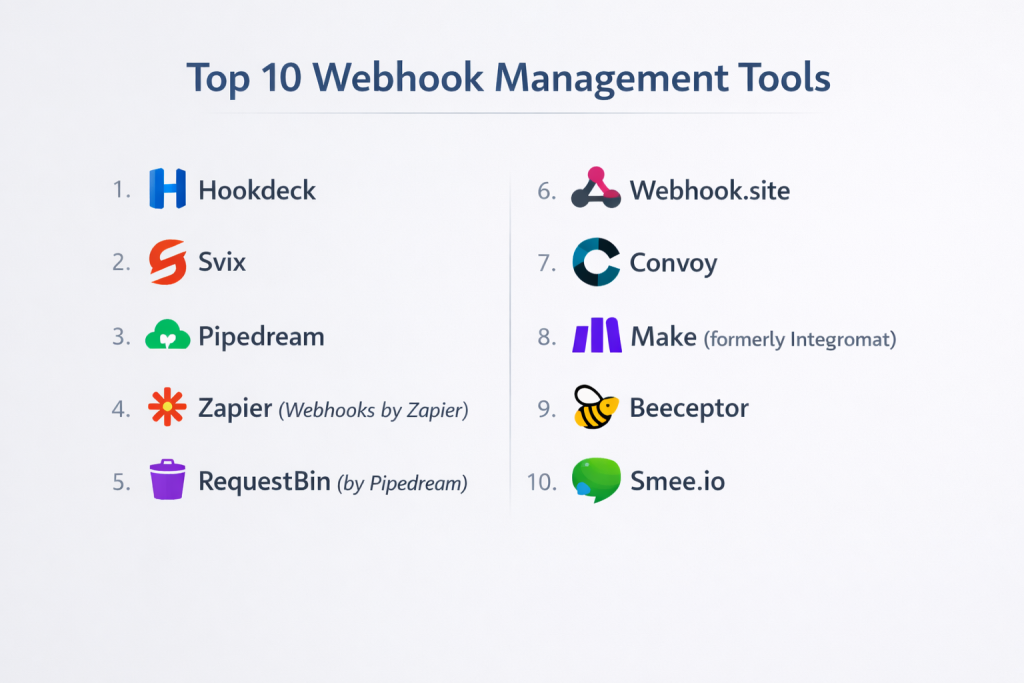
Top 10 Webhook Management Tools
1 — Hookdeck
Hookdeck is a dedicated webhook infrastructure platform designed to help developers manage, monitor, and scale their webhook integrations with zero infrastructure management.
- Key features:
- Automated Retries: Configurable retry strategies to handle transient server failures.
- Rate Limiting: Protects your backend by controlling the speed of incoming webhook delivery.
- Payload Inspection: Full visibility into headers and bodies for every request received.
- Transformation Engine: Modify webhook payloads on the fly before they hit your server.
- Fan-out: Receive a single webhook and route it to multiple different destinations.
- Error Alerts: Instant notifications via Slack, email, or PagerDuty when deliveries fail.
- Pros:
- Extremely reliable; acts as a buffer so you never lose a webhook during downtime.
- The CLI makes local development and debugging incredibly fast.
- Cons:
- Costs can scale quickly for companies with extremely high message volumes.
- The interface, while powerful, has a slight learning curve for non-technical users.
- Security & compliance: SOC 2 Type II, GDPR, and HIPAA compliant; features signature verification and SSO.
- Support & community: High-quality documentation, active developer community, and 24/7 enterprise support availability.
2 — Svix
Svix is a “webhooks-as-a-service” platform that allows companies to send high-quality, secure webhooks to their own customers without building the infrastructure from scratch.
- Key features:
- Consumer Dashboard: A white-labeled UI for your customers to manage their own webhook endpoints.
- Signature Verification: Built-in implementation of industry-standard security signatures.
- Global Delivery: Geographically distributed infrastructure to minimize latency.
- Event Types: Clearly define and version the events your system sends out.
- Operational Monitoring: Real-time health checks on all outgoing webhook deliveries.
- Automatic Retries: Sophisticated exponential backoff strategies included by default.
- Pros:
- Saves months of engineering time required to build a “Stripe-like” webhook experience.
- Excellent focus on the “sender” side of the webhook relationship.
- Cons:
- Focused more on companies sending webhooks than those just trying to receive them.
- Integration requires some initial code changes to your backend.
- Security & compliance: SOC 2, GDPR, and ISO 27001 compliant; uses high-end encryption for data at rest.
- Support & community: Great technical blog, clear API docs, and direct access to engineers for enterprise clients.
3 — Pipedream
Pipedream is a low-code integration platform for developers that provides a robust environment for receiving and processing webhooks through custom code steps.
- Key features:
- Serverless Execution: Run Node.js, Python, or Go code directly in response to a webhook.
- Massive Integration Library: Connect webhooks to 1,000+ pre-built app actions.
- Inspect Tool: Real-time event inspector to view payload data as it arrives.
- State Management: Easily store data between different webhook executions.
- Custom Endpoints: Generate unique URLs for webhooks in seconds.
- Workflow Versioning: Revert to previous logic versions if an update breaks your integration.
- Pros:
- The best tool for quickly “mashing up” data from different sources without a server.
- Very generous free tier for developers and small projects.
- Cons:
- Logic is executed in a serverless environment, which can occasionally face “cold start” delays.
- Not designed for ultra-high-throughput industrial message queuing.
- Security & compliance: SOC 2 Type II compliant; GDPR and CCPA ready.
- Support & community: Vibrant community forum, extensive YouTube tutorials, and dedicated Slack support for teams.
4 — Zapier (Webhooks by Zapier)
Zapier is the world leader in automation, and its “Webhooks” utility allows non-technical users to capture and route webhook data to thousands of apps.
- Key features:
- Catch Hook: A simple URL that captures incoming GET, POST, or PUT requests.
- Visual Mapping: Map webhook JSON fields to other apps using a drag-and-drop UI.
- Filters & Paths: Use logic to only process webhooks that meet certain criteria.
- Formatter: Built-in tools to change date formats, capitalize text, or perform math.
- Scheduled Delays: Wait a specific amount of time before processing a webhook.
- Multi-Step Zaps: Trigger an unlimited chain of events from a single webhook.
- Pros:
- Accessible to everyone; no coding skills required to manage complex data flows.
- Largest ecosystem of connected apps in the industry.
- Cons:
- No advanced developer features like signature verification or manual retry control.
- Can become very expensive as the volume of “tasks” increases.
- Security & compliance: SOC 2 Type II, SOC 3, and GDPR compliant; 2FA and SSO support.
- Support & community: Massive knowledge base, 24/7 ticket support, and a huge global user community.
5 — RequestBin (by Pipedream)
RequestBin is a specialized debugging tool that provides a temporary URL to collect and inspect webhook requests, often used during the initial development phase.
- Key features:
- Public & Private Bins: Choose between open bins for quick tests or private ones for sensitive data.
- Full Header Inspection: View every HTTP header sent by the source platform.
- Human-Readable Payloads: Automatically formats JSON, XML, and form-encoded data.
- Request History: Keep a log of the last several hundred requests for comparison.
- Mobile Responsive: Check your webhook status on the go from a smartphone.
- Integration with Pipedream: Easily transition a test bin into a full automation workflow.
- Pros:
- The industry standard for “sanity checking” a new webhook source.
- Instant setup; no account required for basic public bins.
- Cons:
- Not a permanent management solution; bins are eventually deleted.
- No retry logic or routing capabilities.
- Security & compliance: Varies / N/A (Intended for temporary debugging, not long-term storage).
- Support & community: Shared with Pipedream’s support channels; high-quality documentation.
6 — Webhook.site
Webhook.site is a powerful, high-performance tool that allows users to instantly test, customize, and script responses for incoming webhooks.
- Key features:
- Custom Actions: Write simple scripts to modify how the tool responds to a sender.
- Custom Status Codes: Test how your source handles 404, 500, or 201 responses.
- Real-time UI: Requests appear on your screen the millisecond they are sent.
- Persistent URLs: Paid plans offer permanent URLs for long-term testing.
- Data Redirection: Forward incoming requests to other URLs (Tunneling).
- API Access: Programmatically retrieve and clear your caught webhooks.
- Pros:
- Extremely fast and unencumbered by complex UI elements.
- Excellent for testing “reverse” webhooks where you need to send a specific response back.
- Cons:
- The free version is quite limited in terms of storage time.
- Not an enterprise-grade delivery reliability tool like Hookdeck.
- Security & compliance: GDPR compliant; offers self-hosted versions for maximum data control.
- Support & community: Direct email support for premium users and a clear, functional documentation site.
7 — Convoy
Convoy is the first open-source webhook gateway, designed for high-performance ingestion and dispatching of millions of webhooks.
- Key features:
- Ingress & Egress: Manage both incoming webhooks from others and outgoing ones to your users.
- Static IP Support: Provides a consistent IP for senders who need to whitelist their traffic.
- High Performance: Built in Go, capable of handling thousands of requests per second.
- Customizable Retries: Detailed control over intervals and max retry attempts.
- Subscription Management: Robust API for managing which users get which events.
- Searchable Logs: Quickly find a specific webhook using metadata or IDs.
- Pros:
- Open-source core allows for self-hosting on your own infrastructure.
- Provides a unified “gateway” for all webhook traffic in an organization.
- Cons:
- Self-hosting requires significant DevOps knowledge to maintain at scale.
- The Cloud version is newer and has fewer “one-click” integrations than Zapier.
- Security & compliance: SOC 2 ready; supports secret rotation and advanced signature schemes.
- Support & community: Growing GitHub community, Slack channel, and professional support for Enterprise Cloud.
8 — Make (formerly Integromat)
Make is a powerful visual automation tool that allows for sophisticated webhook processing through a graphical “circular” workflow builder.
- Key features:
- Visual Flowchart: Build webhook logic by connecting icons on a canvas.
- Data Parsing: Native modules for handling complex JSON and XML nested structures.
- Error Handlers: Build specific “fallback” paths for when a webhook fails to process.
- Data Stores: Integrated simple databases to track webhook history.
- HTTP Request Module: High-level control over how you forward data to other APIs.
- Webhooks (Custom): Create custom URLs that can respond with custom HTML or JSON.
- Pros:
- Much more flexible and logically powerful than Zapier for complex data routing.
- Visualizing the data flow helps in debugging multi-step processes.
- Cons:
- Higher learning curve than Zapier; the interface can be daunting at first.
- No specialized developer features like payload transformation at the gateway level.
- Security & compliance: ISO 27001 and GDPR compliant; data centers located in the EU and US.
- Support & community: Comprehensive “Make Academy,” active Facebook group, and tiered support tickets.
9 — Beeceptor
Beeceptor is an API mocking and webhook interception tool that allows you to create a “fake” backend to receive and respond to webhooks.
- Key features:
- Mocking Rules: Define rules to return different responses based on payload content.
- Local Tunneling: Route webhooks from the cloud directly to your localhost.
- Team Collaboration: Shared endpoints for dev teams to debug the same webhook stream.
- CORS Support: Useful for testing webhooks that interact with browser-based apps.
- Latency Simulation: Test how your source platform handles slow-responding endpoints.
- Payload Validation: Checks if the incoming JSON matches a specific schema.
- Pros:
- Perfect for simulating “edge cases” that are hard to trigger in real life.
- Very lightweight and requires zero configuration to start.
- Cons:
- Mostly a development/testing tool; not suitable for production message delivery.
- The UI is functional but lacks the polish of Pipedream or Make.
- Security & compliance: Varies / N/A; standard SSL for all endpoints.
- Support & community: Email support and a well-written documentation site covering common use cases.
10 — Smee.io
Smee.io is an open-source tool created by GitHub that specializes in delivering webhooks from the internet to a server running on a local machine.
- Key features:
- Webhook Tunneling: Bypasses firewalls to send cloud webhooks to a private local server.
- Command Line Client: Simple npm-based client to start a tunnel in seconds.
- Event Re-delivery: The Smee website stores recent events for manual re-delivery.
- Minimalist UI: Focuses purely on the payload and the delivery status.
- Public Service: Hosted by GitHub, but the source code is open for anyone to run.
- No Account Required: Start receiving webhooks instantly without an email address.
- Pros:
- The gold standard for developers building GitHub Apps locally.
- Completely free and maintained by a reputable organization (GitHub).
- Cons:
- Very narrow use case; it only does tunneling and basic inspection.
- Not suitable for production environments or high-security data.
- Security & compliance: N/A; use at your own risk for sensitive data as bins are public by default.
- Support & community: Supported via GitHub Issues and a large community of open-source contributors.
Comparison Table
| Tool Name | Best For | Platform(s) Supported | Standout Feature | Rating (Gartner/True) |
| Hookdeck | Production Reliability | Cloud / SaaS | Inbound Rate Limiting | 4.8 / 5 |
| Svix | Sending Webhooks | Cloud / API | White-labeled Dashboards | 4.9 / 5 |
| Pipedream | Developer Workflows | Serverless / Cloud | Code-level Processing | 4.7 / 5 |
| Zapier | Non-technical Users | Cloud / SaaS | 6,000+ App Ecosystem | 4.5 / 5 |
| RequestBin | Quick Debugging | Web Browser | Instant Payload View | N/A |
| Webhook.site | Custom Scripting | Web / Self-hosted | Custom Scripted Responses | N/A |
| Convoy | Open Source Gateway | Self-hosted / Cloud | Ingress & Egress support | 4.6 / 5 |
| Make | Complex Visual Logic | Cloud / SaaS | Graphical Scenario Builder | 4.7 / 5 |
| Beeceptor | API Mocking | Web / CLI | Localhost Tunneling | N/A |
| Smee.io | Local Dev (GitHub) | Web / CLI | Zero-config Tunneling | N/A |
Evaluation & Scoring of Webhook Management Tools
| Category | Weight | Avg. Score | Analysis |
| Core Features | 25% | 9.0 / 10 | Most tools offer excellent inspection; retries are the key differentiator. |
| Ease of Use | 15% | 8.5 / 10 | Zapier and Hookdeck lead here; Convoy requires more technical setup. |
| Integrations | 15% | 8.8 / 10 | Make and Zapier are unrivaled in their third-party app libraries. |
| Security & Comp. | 10% | 8.2 / 10 | Enterprise tools are strong; debugging tools are often public/insecure. |
| Performance | 10% | 9.2 / 10 | Hookdeck and Convoy are built for high-scale industrial throughput. |
| Support & Comm. | 10% | 8.0 / 10 | Documentation is generally high across the board. |
| Price / Value | 15% | 7.5 / 10 | Costs can vary wildly; usage-based pricing can be unpredictable. |
Which Webhook Management Tool Is Right for You?
Solo Users vs SMB vs Mid-market vs Enterprise
- Solo Users: Pipedream or Webhook.site are perfect. They offer enough power to solve most problems without a monthly subscription.
- SMBs: Make or Hookdeck (Starter) are ideal for managing a growing list of business-critical integrations.
- Mid-market: Convoy (Cloud) provides the centralized control needed as teams grow and data volumes increase.
- Enterprise: Hookdeck or Svix provide the SOC 2 compliance and reliability guarantees that corporate IT departments require.
Budget-conscious vs Premium Solutions
If you have zero budget, Smee.io and Convoy (Open Source) allow you to build world-class infrastructure for free. If you have the capital and want to save engineering months, Svix and Zapier are worth the premium for their “plug-and-play” simplicity.
Feature Depth vs Ease of Use
For Ease of Use, you cannot beat Zapier. However, if you need Feature Depth—like the ability to transform a payload with custom logic, limit the rate of delivery to your server, or verify complex cryptographic signatures—Hookdeck or Pipedream are necessary.
Frequently Asked Questions (FAQs)
- What happens if a webhook is sent but my server is down?Without a management tool, that data is usually lost. With a tool like Hookdeck, the webhook is caught and stored, then automatically retried until your server is back online.
- Is it safe to use public tools like RequestBin for production data?No. Public bins are often indexable by search engines or viewable by anyone who guesses the URL. Always use a private, authenticated service for sensitive data.
- What is the difference between a Webhook and an API?An API is like a menu where you ask for what you want (Pull). A Webhook is like a waiter bringing you food as soon as it’s ready without you asking (Push).
- How do I secure my webhook endpoints?The most common way is via “Signature Verification,” where the sender signs the payload with a secret key. Tools like Svix make this much easier to implement.
- Can I use webhooks to sync data in real-time?Yes, this is their primary use case. However, you must handle “out-of-order” delivery, as webhooks don’t always arrive in the exact order they were sent.
- Do I need a fixed IP address to receive webhooks?No, but some corporate senders require you to whitelist an IP. Tools like Convoy and Hookdeck provide static IPs for this specific purpose.
- Why should I use Hookdeck instead of just writing my own retry logic?Building “reliable” retry logic is harder than it looks. You have to handle database persistence, exponential backoff, and concurrency, which Hookdeck handles out of the box.
- Can webhooks trigger serverless functions?Absolutely. Pipedream is specifically built for this, allowing you to run code in the cloud the moment a webhook arrives.
- How do I test webhooks on my local computer?You need a “tunneling” tool like Beeceptor, Smee.io, or the Hookdeck CLI to bridge the gap between the public internet and your local machine.
- What is “Rate Limiting” in the context of webhooks?If a service sends you 10,000 webhooks in one second, it might crash your server. A management tool “buffers” these and sends them to you at a speed your server can handle.
Conclusion
The “best” Webhook Management Tool in 2026 is the one that fits your role and your scale. If you are a developer looking for a way to ensure your production data never goes missing, Hookdeck and Convoy are the gold standards. If you are a business user looking to connect your apps without code, Zapier and Make are your best friends.
Ultimately, webhooks are the “glue” of the modern internet. Managing that glue with professional tools ensures that your integrations remain strong, your data remains accurate, and your systems remain responsive. Start by identifying whether your primary need is debugging, reliability, or automation, and use the scoring rubric above to find your perfect match.

- Top 10 Email Deliverability Tools: Features, Pros, Cons & Comparison - September 6, 2026
- Top 10 Pharmacovigilance Software: Features, Pros, Cons & Comparison - September 6, 2026
- Top 10 Manufacturing Execution Systems (MES) - July 30, 2026