Cards:
- A card in Bootstrap 4 is a bordered box with some padding around its content.
- It includes options for headers, footers, content, colors, etc.
- A basic card is created with the .card class.
- The .card-header class adds a heading to the card and the .card-footer class adds a footer to the card.
- add a background color the card, use contextual classes. ( .bg-primary, .bg-success……).
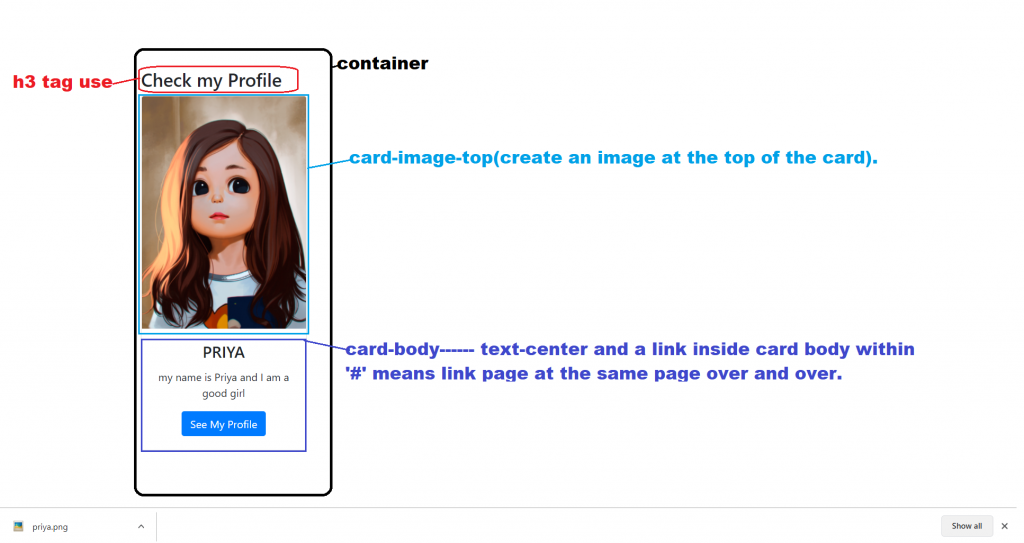
- Add .card-img-top or .card-img-bottom to an
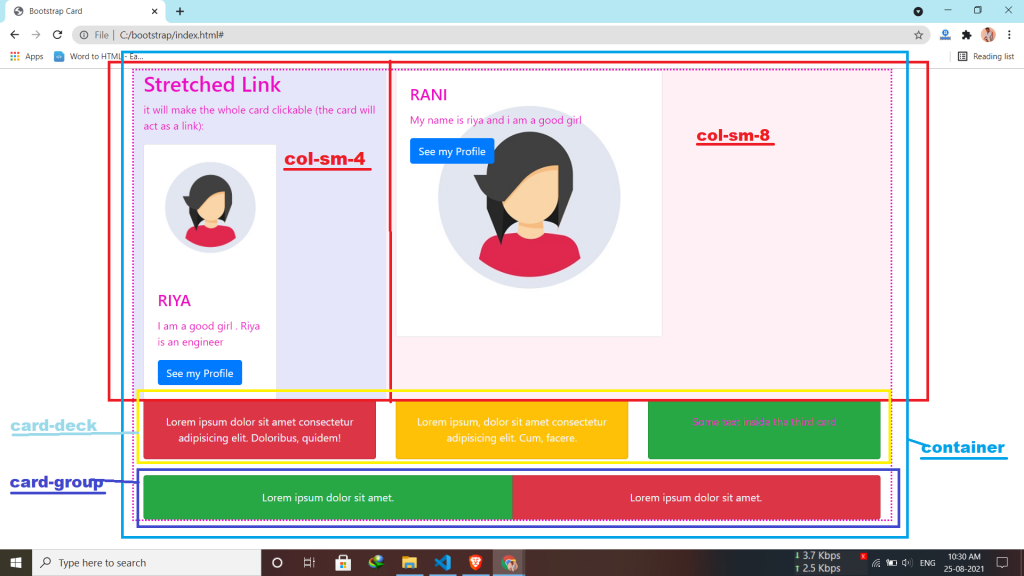
<img> to place the image at the top or at the bottom inside the card. - Add the .stretched-link class to a link inside the card.
- .card-img-overlay to add text on top of the image.
- The .card-columns class creates a masonry-like grid of cards.
- .card-deck class creates a grid of cards that are of equal height and width.
- The cards are displayed vertically on small screens (less than 576px).
- The .card-group class is similar to .card-deck. The only difference is that the .card-group class removes left and right margins between each card.
Syntax:-
<div class="card">
  <div class="card-body">Basic card</div>
</div>
Creat a profile:

Latest posts by vikashdev k (see all)
- PHP OOP: Traits - October 25, 2021
- PHP OOP: Late Static Binding - October 25, 2021
- PHP OOP : Static Members - October 23, 2021